
butflash
-
Posts
14 -
Joined
-
Last visited
Content Type
Forums
Events
Downloads
Store
Everything posted by butflash
-
Thank you r0man0, merci
-
Another question, je m'excuse... How long after the latest MAME release do you update catver.ini?
-
Hi, Been using this for my MAME XMLs since it's creation and love it, thanks r0man0 for the application. However, is there a way to get this running with HBMAME? In that past I've created my HBMAME XMLs manually from the .dat, takes ages deleting all of the unnecessary lines from the XML. Would be great if your XML generator let you use HBMAME with it too. Trying to use HBMAME64.exe returns, "ERROR - WORNG MAME EXECUTABLE".
-


Version 1.0.0
65 downloads
Theme, snap and wheel icon for the MUGEN game "Ultra Street Fighter IV 3D MUGEN Edition"-
- 5
-

-

-
- street fighter
- ultra
- (and 2 more)
-
JACKPOT!!!! It's now working. I have working and complete XMLs. Last night i tried it 4 times, this morning once and none of them worked. This evening I moved the list gen .exe onto the same drive as my mame .191 folder (both are on the root of that drive) and it's working. I hope, if anybody else gets the same issue as me that this solves it for them too. Great work r0man0. Thank you again. Happy days
-
I might have found a fix.... I've just moved the Mame_XML_full_lists_generator.exe to the same drive as my MAME folder (previously i was running the .exe from my C; drive). Upon opening the .exe file I now see the cartoon of birds winding a machine, it's scanning the mame folder. Before I didn't see this when i pointed the app towards my mame .exe location. I think it''s going to work now. I'll post back here when i see the results
-
Hi, Sorry for the delay, busy day today. Thank you for the reply. I got MAME .191 from mamedev org http://mamedev.org/release.html
-
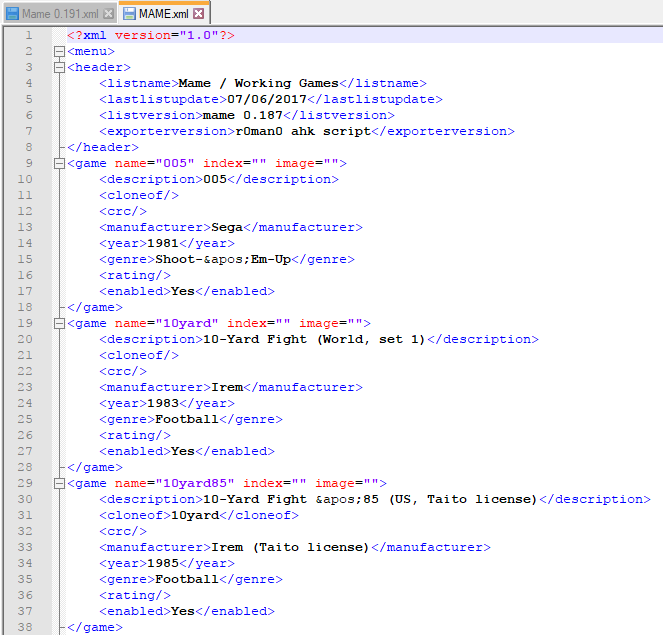
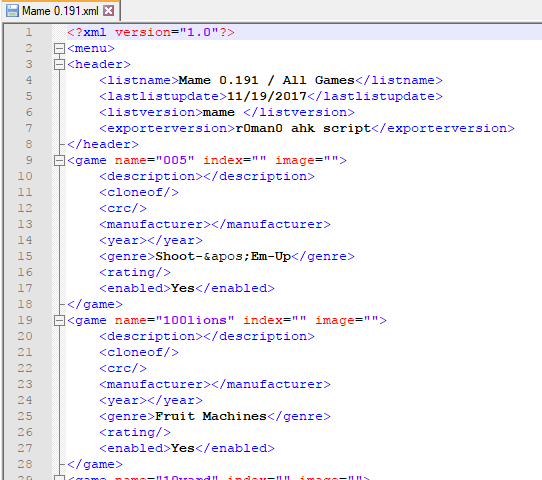
Hi, I'm having a problem with the lists that are generated for Hyperspin, they're not working (Hyperspin jumps back to main menu, when choosing MAME wheel) I used to have a Mr Stiller set (0.187) and noticed that his XML was created by your app, which made me search for this. It's brilliant, VERY VERY good. But... When I create an XML for my .191 set using you app, it does not contain any information for <description>, <manufacturer>, etc. How can this be added? can Your app do it? What am I doing wrong? I've attached two screenshot of the XMLs i mean, .187 (working in hyperspin) and .191 (not working in hyperspin). I hope you can help? Thank you in advance. Rich

-
-
-