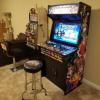
Anon512 Posted May 19, 2016 Posted May 19, 2016 As per the image below, I am referring to a controller with an "elevated" trackball "bezel". I want to cover this entire control panel with graphic artwork (1 piece of course!). Just a few questions: 1. Elevated trackball bezel: How do I integrate this into a control panel artwork that I want to be viewed as "one giant piece" (ie the elevated bezel will destroy my goal of having the artwork be displayed as "one piece") As you can see the trackball "bezel" is elevated. Should I use one piece of artwork for the entire control panel but "exclude" the trackball "elevated bezel" and then find art work for the trackball "bezel" which is the same "theme" as the surrounding artwork for the entire control panel or is there some way to "integrate" this "elevated bezel" into the "one" piece of artwork I plan on installing onto the top of this controller (ie I wish that my trackball "bezel" was not elevated because then I would not have this issue of having to figure out how to integrate this elevated bezel into my control panel artwork "one piece"). 2. I don't own this control panel yet, I plan on buying this from someone (2 hours drive each way to get to him), but if I buy it, I want to add a "one piece" of artwork to the top of it. Therefore, how do I do this if the buttons are already installed (they are crimped on and not soldered I am told by the seller). Do I have to remove the buttons/joystick/trackball to get the "position and dimensions" of the buttons/joystick/trackball areas in order to cut the appropriate holes for these devices or is there a way to cut out the holes for these devices without having to remove them as far as cutting the holes in the artwork?

Recommended Posts
Archived
This topic is now archived and is closed to further replies.