rik81
-
Posts
114 -
Joined
-
Last visited
Content Type
Forums
Events
Downloads
Store
Everything posted by rik81
-
Actually... im not sure what I did... but I removed the media folder. And everything vanished... I created a new hsm folder and let it redownload. Now I have 53 Total media... and only 3 are applied. I cant apply any of the other media... says its applied after clicking on the button. But clicking another tab, and going back. Its back to 3 applied. UPDATE: I cleared the media cache... and it went to 47 media applied.... Atari Jaguar, Atari Lynx, Atari 800, Bandai Wondersan... wouldnt apply. I applied these manually and it unapplied the all the media back to 3. So maybe its just bad media messing with the cache file? UPDATE2: I removed the systems from the list... and the media themes were still listed in the media tab. However I went in and deleted the media manually... and it also deleted. So thats good. I dont know... ill continue to mess around with things.
-
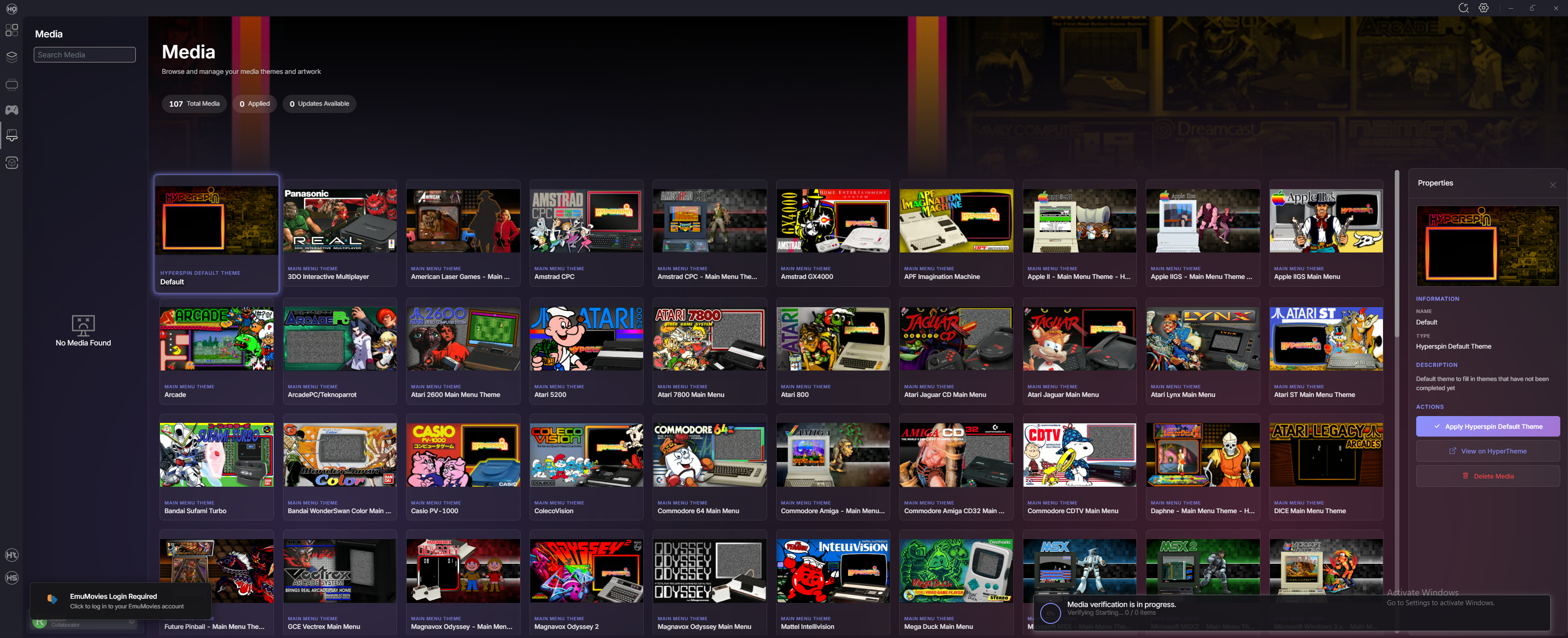
Just to give a little clarity on what I mean... I just ran the reset tool. Clearing out everything and the previews are still here. This is what I was referring to in the orgiianl post. Even if I clear out the hsm folder... and start fresh. Theyre still here. So there has to be something being left behind.... somewhere.

-
I began messing with this again and this is a recap of what happened. 1. After reinstalling the plugins and doing a media refresh. And after removing a bunch of systems that were added during the mass addition phase of setup. The media assignments started working... so I was like ok... lets jump into hyperspin. 2. Once i get into hyperspin... half of them are freezing on the intial load... wont show the main theme at all. And many also worked. The program didnt freeze... just the scrolling between themes. 3. I started removing the ones that didnt populate the media. And readded the system back. This didnt help and the themes were still frozen upon rechecking. 4. I then deleted the entire media folder and made the program redownload the main media themes. There were a few that were now showing.. like teknoparrot. Most of the other ones still didnt populate. (Even though saying there was a theme assigned under the media tab) Mame is still broken... I gets stuck at 10 percent progress when I add my own rom folder. Nor does it have a main media theme as well. I feel some progress was made... but there are still severe problems.... Im hoping the next update aims to address these things. And im also hoping the devs are actively testing the software. I feel its almost there.... Just need to get over these last hurdles. A couple more issues. 1. Cant delete media on the media tab... If you try and delete it. It says it does... but going to another tab and coming back... the media is still there. 2. Where is the file that holds the cache for the images on the media main menu header? I completely restarted with a fresh version and when I loaded all my old systems were still there. I deleted the entire folder. As well as all the fils that get copied to the C drive in roaming and local. And the images were still there. That tells me there are some artifcats being left behind somewhere. Thanks
-
I started from scratch... and I used the new system add feature. THat seemed to work. However at the end of it... im unable to assign any of the main menu media. Started to work... as it was saving my selections. Then i went to a different menu...came back and nothing was saved. Ill try again next month.
-
Hyperspin newest Update - None of the Themes work
rik81 replied to rik81's topic in HyperSpin General
Its the latest version. Ive started fresh. 2.0.102 The download from the server... total was over 300 gigs of the emumovies media... and everything I added was showing up... but had just a load of issues from initial loading... to hyperspin grey screen.. to freezing, to having media not show up... IDK But yeah, beta testing isnt fun... but im still optimistic! And yes... its very feature rich.. the themes look great, when they work. -
Hyperspin newest Update - None of the Themes work
rik81 replied to rik81's topic in HyperSpin General
So I decided to give this another go.... I tried a million things... Limiting media.. removing overrides... Readding wheels... cache flushes... cache deletions... downloading all the media i could... renaming the media to see if it will load etc. I added about 60 different items from the list. I can say without a doubt that if you guys dont get rid of the encrypted cache system.. this never gets off the ground. Its the one thing killing everything and it will never be able to support the number of games that are out there. Even at 30 or so systems... The whole infrastructure was chugging... I dont know how many times I had to restart things to get things to continue moving Not only that... Themes would halfway load.. Themes would free up... Hyperspin during the loading phase would freeze up at different points... And wouldnt even get to the frontend part Hyperspin when it did get to the frontend... stuff wouldnt load... media missing... themes freezing... Hyperspin screen going completely Grey... Had to Alt F4 to get out of it. This project looks really cool... and i was pretty excited when it was released.. I like tinkering with this kind of stuff.. as its basically one of a kind and something that you can customize etc... and im fine with using all the media with the funny codes... but caching all this into something that hyperspin has to read from... is overloading things. (Indirectly linking game and media codes to the system code... and putting it all in one file is what I mean... you're potentially looking at millions of codes) (I would encourage someone from the team add about 60 systems for testing... I think its very important that this be done.. that way you can see all the problems that crop up.. .. youll hit road block after road block. Then you can decide what you want to do... rewrite the code to fix things.. or scrape it all together and just make the overrides default with say... theme support. As theme support is the main focal point of the project) Anyways good luck... I spent way to much time on this over the last two days... I tried everything to make it work. Mentally exhausted. -
Hyperspin newest Update - None of the Themes work
rik81 replied to rik81's topic in HyperSpin General
Its _hsm I dont think you're supposed to know what is what... which is the whole point of having automatic downloads as theyre trying to unify a standardized set of media as per a set of wheels for everybody. In a way... you shouldnt really be tampering with this... and they've made it as complicated as possible to deter people from messing with it. However with that said... the media as is.... is breaking the entire setup. So if you're going to implement something like this... make sure you verify exactly what people are downloading. Because right now.... its a mess... (As mentioned... I removed the folders after looking in them that I didnt want to use... and my entire setup started working again... there's definitely some media in there thats breaking the display system and freezing everything up) For instance... I downloaded hucards in one of the folders I deleted.... I didnt setup any of the NEC systems... why am i downloading hucards? I like a lot of the main system themes, game themes look killer... I like a lot of main wheel logos as they're nicely displayed with super HD resolutions.... And maybe some of the game logos. System themes will be essential... Pointers too.. What is that... 6 things... Concentrate on these... its going to be the core of whats needed to create something great. Everything else is junk... I dont need the videos although some people will def utilize them however getting them to match with their rom sets is gonna be a problem... the only standardized ones are probably mame, atari 2600 and a few others.. ... (Mame themes are nice though), I dont need spines, no manuals, no cabinet images, no pdfs... ... I dont need game box backs... I dont need 3 or 4 sets of snaps in different resolutions... especially when theyre displayed in a smaller box. I dont need game music etc... Its all extra bandwidth for zero benefit... media that nobody is gonna use in the building of their themes. This isnt launchbox. 2D Boxes/3D Boxes/Marquees/Bezels/Carts and CDs will also be useful... but worry about that later... get everything else working first... Like leave the folders open in overrides... but remove all media for the time being and reintroduce these sets later once theres an official public release. -
Hyperspin newest Update - None of the Themes work
rik81 replied to rik81's topic in HyperSpin General
Questions/Concerns that need addressing/Fixing 1. Limiting the sync doesnt work... Even if you turn it off... it tries to download everything 2. Video Snaps - 240p/480p/1080p - Why have 3? Arent these overrides? 1 is enough 3. What is Video Snaps - System? Shouldnt this be in the default folder? 4. Why is Default folder limited to 2 things? How do you apply your own media if your default only has 2 categories? 5 Main Themes/System themes/Main logos need to be updated and downloaded on the fly when you install a system.. This should be 1 number. 6. Not all themes display video... I have video in the overrides and they show for mame, but only after updating the system theme... but dont work at all for something like teknoparrot 7. The Hypertheme search function needs to be redone from the ground up... you cant search for anything and it includes other systems which have nothing to do with your search. Also things should be broken into (Should be shown under the media tab) Essentials Default - (Break into categories or tabs) Main wheel Logos Main theme System Theme Are the main 3 - These should download first... and be automatic since theyre universally needed for everything You cant really show the other things Game wheels/Game Video etc... as its far to many... some in the thousands And theyre shown in the systems tab anyways. Add a preview for the video there too.. that would make sense. Nobody cares about Manuals, Music, Spines, Box backs, etc, other redundant categories. Its just noise. Showing them under the side media tab.. individual system listings does nothing... and really just confuses people. (You would need a browser type viewer otherwise... the only way it would be effective it to show a game list... and then whats missing... this one is missing a video... this one is missing a marquee etc.. so you can go through and add the media that your missing.... other wise its pointless.) Thats just off the top off my head... im sure theres a ton more. -
Hyperspin newest Update - None of the Themes work
rik81 replied to rik81's topic in HyperSpin General
I got some news.... I decided to hop back in after reading the other thread.... What is breaking things is the crap media.... in the extra categories.. I went down the list of folders that downloaded from the emumovies servers.... and deleted anything i didnt want... The whole system sprung to life.... starting working as it should have I am now going to disable downloads completely... then go in and cherry pick what I want in terms of themes from whats available... cause as it stands... there is bad media on the server. -
Hyperspin newest Update - None of the Themes work
rik81 replied to rik81's topic in HyperSpin General
I deleted all the files that get copied on C... readded the systems... and the themes started working. But only for a spin around the wheel or two.... they themes stopped loading after and gets stuck on one of the backgrounds. Media is still pretty busted. Im giving up on this for now... will come back in a month... Im frustrated. -
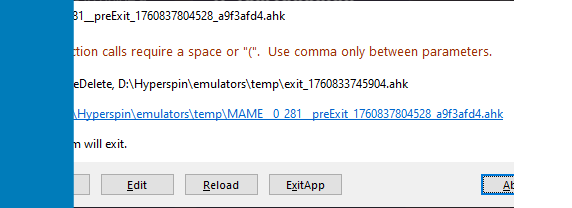
No themes show... at all... Not even the Hyperspin default one. I added 4 systems for testing. MAME - Cause its a staple Sega Genesis - Good Console Choice Mugen - For a PC like add Nintendo Wii U Ware - Custom System The wheel media if you import your own seems to work though. I'm assuming the rest will work... like the videos... once the themes start working as then youll have something to display. I also cant seem to assign the Mugen theme to Mugen... Or any of the system themes. Also on every emulator... I got these errors coming up.... I dont want to run these at all.... How would you disable them? These arent needed... I understand what your trying to do... Im still in the process of downloading all the media. There is still over 20000... im hoping the themes will start working after. I dont think so though since ive already tried to update them with Hypertheme.
-
Windows probably removed the dlls in one of their automated scans.
-
Sounds great and all... but please fix the media... its completely broken on many systems... doesnt display. Overrides dont work. A few things. You can see all the media in hyperHQ... it just dont show up in hyperspin. Fix this... and the popularity shoud drastically increase... right now... its on life support.
-
Please do! This is great news! If it pans out....
-
Kind of barking up the wrong tree buddy.... Buying systems is frowned upon here... you were supposed to build your own set. Generally though if you can see them in RL... then they should all appear in hyprespin HyperHQ... is there somewhere.. probably where the hyperspin exe is.
-
Wouldnt be a loser if they just stuck to what worked before... And after messing with Hyperspin 2 extensively.... creating something with a high number systems... collapses under its own weight. IDK.... Hopefully 25H2.. fixes HS1.
-
Well... 3 weeks have gone by... So much for the bi weekly update.
-
I remember when it first released... there was a file with a huge list of systems... some you could add media.. some you couldnt... There was literally no difference between them and they all had their hash codes. Also... what about overrides... none of those have hash codes.. and some systems use the overrides while others completely ignore them. Dont you think this should be the first thing that should be worked on? Otherwise.... your just shooting yourself in the foot. People will come... and lose interest. Every other feature can wait.
-
Its the sxs.dll file... it got updated in the system32 folder... Which doesnt work with hyperspin. Needs to be replaced... but you cant just update the folder manually with the file as its protected.
-
Its only certain wheels... needs to be fixed on the backend. Something to do with the cache files... who knows.
-
I use faststone image resizer. Does everything in batch.
-
Small update.... Things are struggling... but I am getting some success by clearing cache... rebuilding and restarting HyperHQ. IDK... ill continue to add systems and stress test things
-
Ive added 30 systems.... and the process of building everything in HyperHQ is... STRUGGLING HARD. Theres no way this cache system which adds every piece of media to a database will ever be viable. Theyll have to rewrite it.
-
Yeah it seems that if the list of systems isnt approved... as in... when you do a system search. They wont sync any media at all... you can still see the overrides for the media in HyperHQ though. Hopefully this is addressed in the next update. Theres a few things I would like to add which currently will not work.
-
Custom Systems still dont add any media. At least Mame and Atari 2600 are working ok. The custom system I added was American Laser games.