liveinabin
-
Posts
34 -
Joined
-
Last visited
Content Type
Forums
Events
Downloads
Store
Everything posted by liveinabin
-
Oh, ha. Never mind. I reset my machine and its fine. Has been all day. Superb script, thanks again.
-
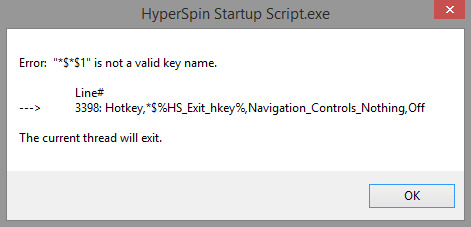
Customizable controls!!! Thanks ghutch92! I do have a small problem though, when I start Hyperspin (via the script in HyperHQ), I get this error and the script aborts: I've tried using the automatically generated INI as well as my own mod(that just has a few keys swapped). Same problem. Any thoughts? I've trawled through my settings on HyperHQ and Hyperlaunch HQ. Can't see anything. There are no keymappers active.

-
Oh, should add that I have xpadder disabled hence no xpadder.ini
-
Sorry for the late reply. OK, here are my scripts: Hyperspin startup settings: [Required] HyperSpin_Folder_Path=C:\HyperSpin HyperLaunch_Folder_Path=C:\HyperSpin\HyperLaunch [General] Primary_Color_RRGGBB=363636 Secondary_Color_RRGGBB=ffffff [Controls] Joysticks_Enabled=True Joystick_Delay=225 Joystick_Deadzone=25 [startup] Minimize_Background_Windows_Enabled=true Window_Classes_To_Not_Minimize=Shell_TrayWnd,Button Process_Name_To_Close_1= Program_To_Run_Target_1= Program_To_Run_Working_Dir_1= Program_To_Run_MaxMinHide_1= [Exit] Restore_Windows_On_Exit=True Process_Name_To_Close_1= Program_To_Run_Target_1= Program_To_Run_Working_Dir_1= Program_To_Run_MaxMinHide_1= [Roulette] Roulette_Key=~1 Roulette_Min_MilliSeconds=3000 Roulette_Max_MilliSeconds=8000 [Volume_Menu] Volume_Menu_Key=~2 Volume_Bar_Offset_From_Bottom=44 [QuickLaunch] QuickLaunch_Key=~3 QuickLaunch_Enabled=true QuickLaunch_Left_Offset=5 QuickLaunch_Top_Offset=10 QuickLaunch_Bottom_Offset=10 Item_1_Path= Item_1_Parameters= Item_1_LogoPath= Item_1_Ignore_Process_Close=false and my settings.ini [Main] Hyperlaunch_Path=C:\Hyperspin\HyperLaunch\ Menu_Mode=multi Single_Mode_Name=Sega Model 2 Enable_Exit_Menu=true Enable_Exit=true Exit_Default=yes Exit_Action=exit Version=1.0.0.0 Last_System=MAME Hyperlaunch_Path=C:\Hyperspin\HyperLaunch\ [Resolution] FullScreen=true Width=1920 Height=1080 Scanlines_Active=false Scanlines_Image= Scanlines_Scale=2 Scanlines_Alpha=0.1 [Optimizer] CPU_Priority=normal Quality=HIGH Image_Smoothing=true Animated_Backgrounds=true Inter_Backgrounds=false Level1_Backgrounds=true Level2_Backgrounds=true Level3_Backgrounds=false Level4_Backgrounds=false Special_Backgrounds=true Wait_For_Special=false Animated_Artworks=true Level1_Artworks=true Level2_Artworks=true [introVideo] Use_Intro=true Stop_On_Keypress=true [sound] Master_Volume=100 Video_Volume=100 Wheel_Volume=20 Interface_Volume=100 [AttractMode] Active=false Time=60 MaxSpinTime=10 HyperSpin=false Wait_For_Video=false [Keyboard] Key_Delay=true [P1 Controls] Start=13 Exit=27 Up=38 Down=40 SkipUp=37 SkipDown=39 SkipUpNumber=70 SkipDownNumber=86 HyperSpin=32 Genre=71 Favorites=76 [P2 Controls] Start=69 Exit=81 Up=87 Down=83 SkipUp=65 SkipDown=68 SkipUpNumber=74 SkipDownNumber=77 HyperSpin=88 Genre=72 Favorites=90 [P1 Joystick] Enabled=false Joy=0 Threshold=40 Start=Button_10 Exit=Button_5 Up=POV_Up Down=POV_Down SkipUp=POV_Left SkipDown=POV_Right SkipUpNumber=Button_8 SkipDownNumber=Button_7 HyperSpin=Button_6 Genre=Button_4 Favorites=Button_1 [P2 Joystick] Enabled=false Joy=1 Threshold=40 Start=Button_10 Exit=Button_5 Up=POV_Up Down=POV_Down SkipUp=POV_Left SkipDown=POV_Right SkipUpNumber=Button_8 SkipDownNumber=Button_7 HyperSpin=Button_6 Genre=Button_4 Favorites=Button_1 [Trackball] Enabled=false Sensitivity=90 [spinner] Enabled=false Sensitivity=90 [startup Program] Executable=HyperSpin Startup Script.exe Paramaters= Working_Directory=C:\Hyperspin\Utilities\ WinState=NORMAL [Exit Program] Executable= Paramaters= Working_Directory= WinState= [LEDBlinky] Active=false Path= [HiScore] Active=false Y=550 Delay=2
-
Explorer.exe Huh? Seems logical. If anything is screwing things up, I'd imagine it's Microsoft UPDATE : well boil my auntie! I just turned on the Hyperspin intro movie and the focus problem just went away. I'd never thought to have it running. Maybe I can replace it with some eye watering filth, that'll be nice.
-
It's a custom built arcade cab, but it's nothing special. Essentially a PC connected to a monitor with two of these MC Cthulhu controller boards that present themselves to windows as standard USB game pads. I'm not shelling anything. It's just a regular Windows 8 PC in a big wooden box As for the default keymap options - the main fire button (that a PS3 would read as X, and which the PC reads as controller button 2) is now Escape - I need it to be Enter. Enter is mapped to the middle button of my top row of keys: It's like this - I currently have: ( ) (Enter) ( ) (Escape) ( ) ( ) I need my layout would be: (Escape) ( ) ( ) (Enter) ( ) ( ) with my Start button also serving as Enter That's really easy to set up in xpadder but then we have the issues with focus.
-
OK, I'm beginning to understand now. My problems are all coming from the fact that I have joypad encoders in my cab rather than keyboard encoders. The predefined keymaps that Hyperspin now understands (sans xpadder) are so far off as to be unusable (this arcade cab is meant to be easy to use) so I'll have to find some xpadder enabled route or, I guess, ditch Hyperspin. Now I still have this problem with lack of any control at Hyperspin start when using this script. My main frustration comes from Hyperspins apparent inability to understand even a pretty default game controller without all this help, I mean it's a game launcher for goodness sake Still, if there's absolutely no way round this control problem but to wait for an update to your wonderful script, I will dutifully do so (though I feel terrible putting the pressure on you when this is all Hyperspins fault). I'm just still wondering if it's my system and if there's anything I've missed. Heck, would it even be an option for me to have one xpadder profile running all the time in all programs essentially mapping the sticks to the default MAME keys? That way, I probably wouldn't even need this script (?) and I could just remap other emulators to suit. Would that work?
-
Hmm, I've tried everything as suggested but all to no avail. The script does indeed control Hyperspin without xpadder (although my main fire button is now 'escape') but I still don't get any control unless I ALT-Tab in and out. As for the solution above allowing xpadder in the new script - I got that working but still the Alt-tab thing. Ghutch was mentioning that it happened on his slow computer. This is no powerhouse but it is a new Intel pentium anniversary chip overclocked to 4.0Ghz (with a load of fast RAM and a GTX750i card) - surely that should be enough.
-
Wow. This is all very exciting. I'll give it a try later on (I think I'll temporarily delete Xpadder and all profiles just to be thorough) and I'll report back. I believe the keymapping on the Cthulhu is pretty similar to the PS360+. They're both multi console boards for fight sticks.
-
This might be a question so dumb, I'm regretting it even as I type...but... No xpadder? What, like, at all? Surely you need to be able to define what button does what, don't you? That said, I've come to a Hyperspin PC build as a replacement for my cabs previous 'guts', a modded Xbox. I guess that system had premapped controllers.
-
I've got an arcade cab with two MC Cthulhu boards marshalling all the inputs. I'm very confused about how to set up now. I've been fighting with this for a week or two and I'm lost. The video was (is) superb and laid everything out in one place nice and easily. So, in idiot terms, what should I be doing different with script 1.06? Sorry to sound like an idiot, but I've been trying to keep up with the myriad 'exceptions to the rules' that pepper Hyperspin and now my brain is fried:)
-
Hi all. Just set up this lovely script (with lots of help from this video ). Am I getting the same fault as others here? Hyperspin starts up, I have no control from either the stick or the keyboard. I have to either Alt-Tab or Windows Key out and back ( yeah, I'm on Windows 8 ). After that, it's fine. Anyway, entirely probable that it's me - usually is. Here's my script setup. [Required]HyperSpin_Folder_Path=C:\HyperSpin HyperLaunch_Folder_Path=C:\HyperSpin\HyperLaunch [General] Primary_Color_RRGGBB=363636 Secondary_Color_RRGGBB=ffffff [Controls] Joysticks_Enabled=False Joystick_Delay=225 Joystick_Deadzone=25 [startup] Minimize_Background_Windows_Enabled=true Window_Classes_To_Not_Minimize=Shell_TrayWnd,Button Process_Name_To_Close_1= Program_To_Run_Target_1=C:\Hyperspin\Hyperlaunch\Profiles\Xpadder\HyperSpin\p1.xpadderprofile Program_To_Run_Working_Dir_1= Program_To_Run_MaxMinHide_1=Hide [Exit] Restore_Windows_On_Exit=True Process_Name_To_Close_1= Program_To_Run_Target_1= Program_To_Run_Working_Dir_1= Program_To_Run_MaxMinHide_1= [Roulette] Roulette_Key=~1 Roulette_Min_MilliSeconds=3000 Roulette_Max_MilliSeconds=8000 [Volume_Menu] Volume_Menu_Key=~2 Volume_Bar_Offset_From_Bottom=44 [QuickLaunch] QuickLaunch_Key=~3 QuickLaunch_Enabled=true QuickLaunch_Left_Offset=5 QuickLaunch_Top_Offset=10 QuickLaunch_Bottom_Offset=10 Item_1_Path= Item_1_Parameters= Item_1_LogoPath= Item_1_Ignore_Process_Close=false