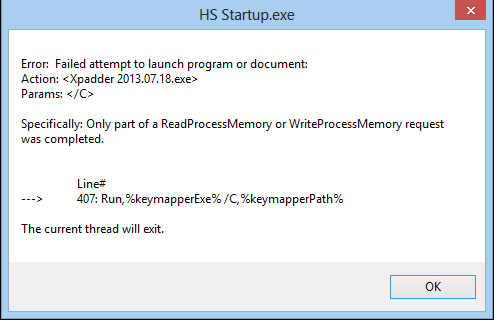
Sorry, Im not to good with the Xpadder thing. When I set this up and run it, I am getting this error:
Here is my Startup script:
[settings]
HyperLaunch_Path=P:\Hyperspin Project - The Frontend
Hide_Cursor=false
Hide_Taskbar=false
[Keymapper]
Keymapper=xpadder
Keymapper_Enabled=true
keymapperAhkExternalEnabled=false
[Programs]
Minimize_Background_Windows_Enabled=false
Window_Classes_To_Not_Minimize=Shell_TrayWnd,Button
Program_To_Run_Target_1=button_on_360_guide.exe
Program_To_Run_Working_Dir_1=
Program_To_Run_MaxMinHide_1=Hide
Process_Name_To_Close_1=
It says it cant read or write it? If I load Xpadder without the startup script it runs fine but even though the profile is loaded it will not action anything within Hyperspin?
Anyone have any ideas?
SOLVED!!
Seems that the program I was running with it does something with the Xpadder Profiles. It loads Xpadder but it takes over a min before it comes responsive. It also does the same when you change the profile. Example if you switch between games/systems.
The program was there to enable the Microsoft button in the center. This was my ESC button for leaving games. Seems I will just have to map out a new button For the Exits.
Anyways, left this post up in case anyone else runs into the same issues.
Great little script though. Many thanks for the contribution on this, made my life much easy.
Now if only I could find a way to exit Xpadder on EXIT??