123jimbo
-
Posts
18 -
Joined
-
Last visited
About 123jimbo

- Birthday 01/01/1970
123jimbo's Achievements




-
Cool, no probs, my plans were always to re-enable it anyhow. Excellent add-on. Cheers, Jim.....
-
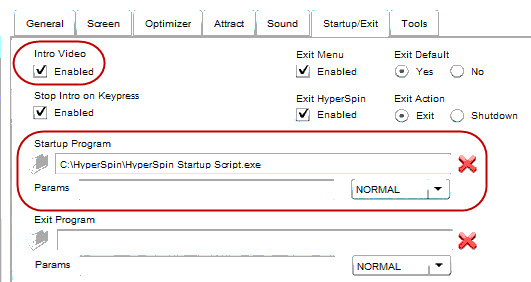
Contents of HyperSpin Startup Script.ini (close to default I think) [Required] HyperSpin_Folder_Path=C:\HyperSpin HyperLaunch_Folder_Path=C:\HyperSpin\HyperLaunch [General] Primary_Color_RRGGBB=363636 Secondary_Color_RRGGBB=ffffff [Controls] Joysticks_Enabled=False Joystick_Delay=225 Joystick_Deadzone=25 [startup] Minimize_Background_Windows_Enabled=true Window_Classes_To_Not_Minimize=Shell_TrayWnd,Button Process_Name_To_Close_1= Program_To_Run_Target_1= Program_To_Run_Working_Dir_1= Program_To_Run_MaxMinHide_1= [Exit] Restore_Windows_On_Exit=true Process_Name_To_Close_1= Program_To_Run_Target_1= Program_To_Run_Working_Dir_1= Program_To_Run_MaxMinHide_1= [Roulette] Roulette_Key=~1 Roulette_Min_MilliSeconds=3000 Roulette_Max_MilliSeconds=8000 [Volume_Menu] Volume_Menu_Key=~2 Volume_Bar_Offset_From_Bottom=44 [QuickLaunch] QuickLaunch_Key=~3 QuickLaunch_Enabled=true QuickLaunch_Left_Offset=5 QuickLaunch_Top_Offset=10 QuickLaunch_Bottom_Offset=10 Item_1_Path= Item_1_Parameters= Item_1_LogoPath= Item_1_Ignore_Process_Close=false Attached is the Startup/Exit tab of HSHQ

-
Yes, HS to start the script and I launch HS.exe,.. I had temporarily disabled the 'intro video' and left it like that and started to introduce this 'startup script'. Straight after re-enabling it, all now seems to be working as expected.
-
Tortoise is back, found nothing more though. My focus issue seems to be linked to whether the 'intro video',.... I had it disabled and consistently had the focus issue. After enabling it, all now seems to be ok.
-
I'll re-check the 1st post slowly.
-
Apologies, must have skipped over that part of 'getting it going'. Mostly working now, my only quirk is upon first start behaviour is that HS has no focus, I have to alt-tab back to itself and then it all behaves. If I remove it from HS startup scripts then HS starts with focus and behaves but obviously I have none of the extras that the script brings.
-
Just does a random spin. Like 'Russian roulette'.
-
Great, thanks for clearing that up. I thought that '2' was the key, but as nothing happened when I was pressing it, I started to think that there may be more to it. I do like the clean switching b/w game and back to the wheel. Any suggestions on where to I start looking at why the 'volume menu' did not show? Currently I have my HS configured for only the MAME wheel,.. StartScript starts HS ==> HS intro ==> MAME wheel.
-
Sorry, I'm still lost with it. Saw that link before also. I don't see where the 'hotkey is defined' ? I just assumed that those ini file sections (Roulette/Volume/QuickLaunch) had it all defined there - maybe they do Its not as simple as 'numeric 2' to activate the volume menu bar is it ? (coz I tried that )
-
Noob question here and probably more of an AutoHotKey one at that, but how does the key mapping bit work ? What does ~2 mean ?