


reznnate
-
Posts
654 -
Joined
-
Last visited
-
Days Won
8
Content Type
Forums
Events
Downloads
Store
Everything posted by reznnate
-

HyperspinFE beta7 bug reports and feedback
reznnate replied to reznnate's topic in HyperSpin Android
I updated the wheel-copier app. While creating various uSD cards for myself, I found and fixed some annoying bugs. Also worth noting.... these storage saving features can be huge: --base wheel media - only copies the media files needed for base hyperspin. Manuals, Bezels, and other folders are ignored (this is visible in folder browser) --minimal main menu media - my source main menu folder is 55GB. This only copies the media needed for the folders you select. I should probably change this default to ON always. --only only media with roms - this for CD/DVD based systems and can save a ton of space for huge systems like PS1 and PS2 -
HyperspinFE beta7 bug reports and feedback
reznnate replied to reznnate's topic in HyperSpin Android
It should be working. It works for me. It keys off of this parameter [video defaults] path=D:\arcade\Media\MAME\Video\ -
Starting a new thread I'll be following for when bugs are found. I'm sure I missed a few.
-
This device? https://www.gsmarena.com/xiaomi_pocophone_f1-9293.php Old version of Android is concerning but the fact it's not crashing and allowing you to enter app GUI makes me think it may actually be a conflict with your setup. First thing, I'd try deleting (moving) your old Settings_Android/ folder because they share nothing in common with the old app. A quick way to test your setup (vs device) compatibility is with Windows build I posted. Drop it anywhere and use -d "<Hyperspin folder path>. So far I've only tested on Shield, FireTV 4K, Anbernic RG477M, Retroid 3 (I think), and I've ordered the Ayn Thor (hasn't arrived yet). Current build is 64b only and doesn't work on the Shield Tube (for example).
-
I posted a few apps I built for myself. The first is the wheel editor I used to make the different wheel designs and mimic Hyperspin wheels. The second is a file selector/copier I use to copy certain wheels from my main 500-wheel setup to smaller sized storage for my Android handhelds. I've got one uSD with old retro cart-based systems and then I've got a bunch of others for each of the DVD/GDROM/CD-based systems and I use the rom-picker to be more selective about the games I want to carry around (and fit).
-
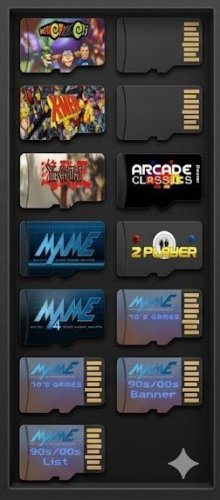
Hyperspin wheel copier View File Sharing an app I made for myself. I use it to make "sub-wheel versions" of my main 22TB Hyperspin drive to various smaller uSD cards. It allows me to carefully fit the specific wheel media + roms I want and target various sized storage devices. Submitter reznnate Submitted 05/29/2026 Category HyperSpin (Android) File Count 1 Credits Reznnate
-
Version 1.0.0
3 downloads
Updated b8 with bugs fixes Sharing an app I made for myself. I use it to make "sub-wheel versions" of my main 22TB Hyperspin drive to various smaller uSD cards. It allows me to carefully fit the specific wheel media + roms I want and target various sized storage devices. This only copies media and rom folders, it doesn't mess with Windows emulators or Rocketlauncher folders. hyperspin-wheel-copier_b8.exe -
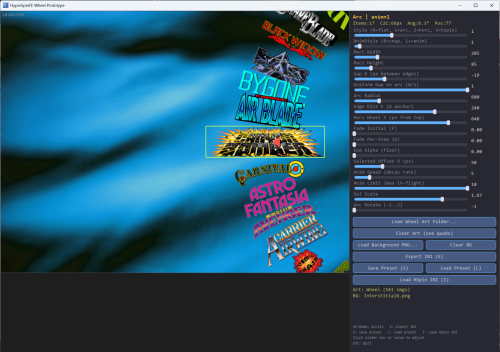
Wheel editor/visualizer tool View File Allows you to create different wheel designs in the case existing wheels aren't lining up, etc. Submitter reznnate Submitted 05/28/2026 Category HyperSpin (Android) File Count 2 Credits Reznnate
-
Version 1.0.0
20 downloads
Allows you to create different wheel designs in the case existing wheels aren't lining up, etc. -
Another suggestion for those dusting off old HS1 hard drives or NVIDIA Shields or whatever, the pain and suffering related to Hyperspin setup and tuning and fixing and renaming is a different ball game now. Use ChatGPT. I've started building a NEW setup (crazy, I know...), and I've been using AI to 'make me a dbase xml file matching these roms', 'identify missing assets', 'create wheel art for xyz game'. etc. etc..
-
Oh, one more tip I used while testing Windows version. You can drop the files into a separate folder and use -d <hyperspin path> such as "C:\hyperspinfe_desktop.exe -d G:\Hyperspin". This allowed me to easily test different builds of Hyperspin wheels and themes. It will create /Settings_Windows folder with modified settings and new feature parameters, wheel indexes and such. Just wipe the folder or any separate files if you want to 'reset'.
-
While Shield is the ideal form factor device IMHO, the updated app also runs on other Android gaming handhelds, tablets and phones now although I've only debugged and tested a few so far. The vast majority of my performance and play-testing has been on NVIDIA Shield. Let me know if you find bugs or problems.
-
Yes, go into wheel of choice that has a favorites list txt file, click both sticks (R3+L3), go to wheel filters, and select Favorites. Or on Windows, press F1 to bring up the menu. F11 switches between fullscreen/window as well. Forgot to add those in the doc, focus has been Android. Also, Shield is now 10yrs old and other Android devices are cable and now work properly. IMG_9012.MOV
-
Posted beta 7 build. I've fixed issues with non-NVIDIA gpu drivers and made my Windows build available as well. This version includes a number of new effects, bug fixes, performance and image quality enhancements. This will be the last build for awhile. Let me know if you have questions.
-
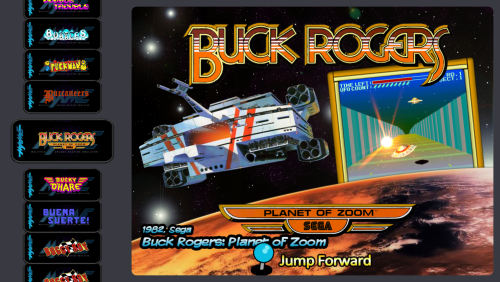
Beta7 - HyperspinFE app View File Beta7 adds support for other Android devices and Windows. Submitter reznnate Submitted 05/26/2026 Category HyperSpin (Android) File Count 4 Credits Reznnate
-
34 downloads
Beta7 adds support for other Android devices and Windows. -
I'm not familiar with this. On PC, Rocketlauncher defines different emulators per game rom? As for that navigation issue, sounds like my bug. I'll look into it. Thanks for reporting it.
-
The folder should be in your Hyperspin folder, next to the other /Settings folder. I haven't seen an issue were they were written somewhere else. What does your folder structure look like? Is this on Shield?
-
As you can tell, I've been looking for ways to improve Hyperspin1 for my Android handhelds and arcade cabinet. In the next build, I've added proper sound support, windows desktop support (rocketlauncher, LEDBlinky), and a cache/index system for slow media (can be enabled/disabled). Also, I added the ability to stack multiple themes for a game if many good themes exist (i.e. dkong.zip, dkong_1.zip, dkong_2.zip). It just randomly selects one. But mainly looking for bugs I've missed. Testing on a fast PC versus slow Shield has helped find a few (a/v sync has been a bitch!). Testing of features and additional hard drives is relatively easy now. All of the app settings are copied and mods happen in \Settings_Android. Nuke files in that folder (or entire folder) to 'reset'. I should have a new update next week. While I'm not planning to disappear for 10yrs , I'm running out of things to fix/add and my short-attention span is starting to engage.
-
For me, it launches directly into game, but then as you say, the emulator seems to lack a direct-quit button so requires exit game emulation, exit emulator. If you guys aren't tripping over lots of bugs and don't have other features or change suggestions, I'll post a release candidate soon. If you have other Android devices with external storage support (sdcard or usb ports), give them a try. My goal is to support all the new gaming handhelds coming out of China.
-
Emulator worked outside of launcher? You will need to give Super3.apk file permissions first. Then it worked for me.
-
I haven't tested Super3 yet but I do have setup parameters for it. It's possible you may need to tweak the .ini directly if it doesn't work. Specifically uri_type=0-3
-
Posted the new beta6 build. Consider this a release candidate. I changed a lot trying to make things more user-friendly. Lots of new features that might be confusing since they're unique to Android. Hopefully this version 'works' directly with existing windows drives and setups people have lying around. Let me know if my user guide isn't clear or if you find bugs (I'm aware of several I haven't fixed yet...).
-
HyperspinFE-shield64-b6.apk View File This is close to final. Let me know what bugs you find or features that are missing. Submitter reznnate Submitted 05/05/2026 Category HyperSpin (Android) File Count Credits
-
I'm still actively implementing features that I missed. The video path .ini setting is working now. I'll have another beta for testing this week. Lots of new features.. hopefully not too many new bugs. Feedback is appreciated.

