


newoski
-
Posts
1,063 -
Joined
-
Last visited
Content Type
Forums
Events
Downloads
Store
Development Tracking
HyperCL
Posts posted by newoski
-
-
That's missing some key points in the process tho, namely where to populate the files from...
Whatever logic you choose. It's simple. For me, I use it for games like Pacman, 2p versions, and joystick versions of games. That's it. It's not complicated
Sent from my HTC6535LVW using Tapatalk
-
Nice app, but it seems like using it would take just as much time as just doing CTRL-Find for each game on the clone list and uncloning it. Probably longer since you'd need to double check that it got them all. Or are you guys actually using the app to do something else?
The sole point to to automate repeating the process. Yardley and I use it every update. Takes 10 seconds to update our databases the same way, each update
Sent from my HTC6535LVW using Tapatalk
-
My goal here isn't to contribute to the lists. Simply to make updating MAME, while using modified XMLs, less cumbersome
Sent from my HTC6535LVW using Tapatalk-
 1
1
-
-
I'm hoping that @phantasy can take this all and put together a guide as I'm a little bit confused right now! Isn't the hard part getting the lists in the first place?
I would think the hard part is repeatedly generating XMLs with the same, limitless customisations
Sent from my HTC6535LVW using Tapatalk
-
Please add this to the upload page so you get more visibility
Once people test it, I will
Sent from my HTC6535LVW using Tapatalk
-
39 minutes ago, thatman84 said:
Awesome im starting to get my mame setup in order this last week and planing on using a 184 set, but still running Metalzoics old xml as didnt have Phantasy's updated one to hand.
How do we go about creating the txt lists required? @newoski
I provided samples, but it's just a plain txt list like below:
dkong tmnt simpsons xmen -
I also have a Genre remover, which does the same thing on a more aggressive Genre level. IE, it automatically removes the defined Genres from all XML. Very handy for removing Casino, Mature etc. I'll post about that ASAP
-
1
-
-
Hi Guys,
Video will follow, when I have time to create one. In the meantime...
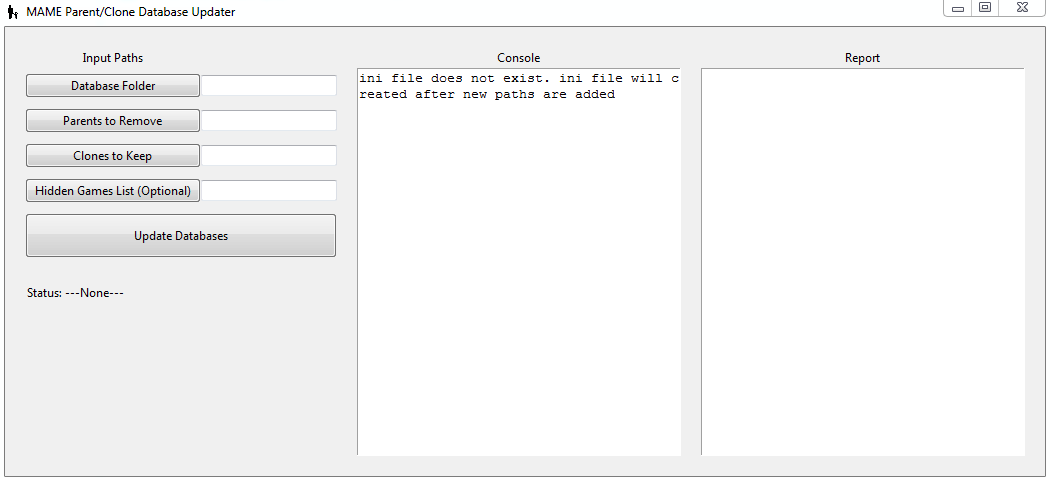
The GUI is very basic and it includes an additional parameter -- Hidden Games List -- that I don't think many others will need to use:
To get started, define the following paramters:
Database Folder
- Path to a folder containing the MAME XML databases that you'd like to updateParents to Remove:
- TXT file containing a list of MAME Parents you'd like to remove from all your XMLs in the Database Folder (see sample file for formatting)Clones to Keep:
- TXT file containing MAME Clones you'd like to keep, by converting them to Parents, on all XMLs in the Database Folder (see sample file for formatting)Hidden Games List:
- IGNORE THIS PARAMETER. This is an optional parameter that will not be required by 99% of users. Ignore it for now. Explanation to included when I publish the app
After defining all paths, except for the Hidden Games List parater which should be left blank, click "Update Databases".
The app do two things, quickly:
1. Remove any games defined in the Parents to Remove list
2. Convert to parents -- by emptying the "clone of" field -- any games defined in the Clones to Keep list
The app stores your settings. After each update, simply do the following:
1. Download the latest XMLS
2. Put them into the Databases Folder
3. Run the app and click "Update Databases"
Give it a test and let me know if you have any questions.
Download: https://www.dropbox.com/s/vizfbzcyv8vzo2p/MAME Parent Clone Database Updater.zip?dl=0

-
1
-
-
I'll post back ASAP. New baby so life is a bit upside down. Video overview to follow plus download link
-
2
-
-
I'd like to remind everyone that I made and app that can do these edits in a split second, after each MAME update. Still looking for beta testers but Yardley and I have used it for about a year with no issues...
Sent from my HTC6535LVW using Tapatalk -
On 6/4/2017 at 2:33 PM, ulao said:
Avar, as always thank you for spreading the word. I did want to add one of the more impressive new features, LCD writing. This is going to be a very easy mechanism for emulation developers. I strongly encourage everyone to spread the word on this. You do not need any drivers or plugins just way to send data to basic HID calls. I'll be releasing the source code for the command line and C# to show how simple this will be.
[/video]
Will command line / API programming of controllers be available on the controllers level, or the Port level only?
Which, for simplicity sake, is to say...If we were only using Port1, would we be able customize the button programming for NES, SNES, and N64 controllers, independently of eachother? Or would we only be able to make changes at the Port, not controller, level?
-
which file do you need exactly?
I'm not sure, as I only know xpadder. The equivalent of your controller layouts and per say mappings.
Sent from my HTC6535LVW using Tapatalk
-
Thanks, but I'm looking for your joy2key folder/mappings
Sent from my HTC6535LVW using Tapatalk -
Yes you can. In joy to key I have a profile for each port essentially for each player
I can do that in xpadder. No mapper will solve the problem I'm describing, outside of being able to remap bliss box mappings.
Can you send me your joy2key full folder and mappings? Want to take a look
Sent from my HTC6535LVW using Tapatalk
-
Doesn't fix my issue, which has little to so w xpadder directly... unless you can do multiple layouts per system
Sent from my HTC6535LVW using Tapatalk -
newoski, please just get with AVAR. He has pretty much done what you are offering. I'm not really the "document" type. I thought he did a pretty good job but maybe send him a PM. He'd be happy to help.
Genuinely nog trying to be critical of anyone. Just looking to help. Will do
Sent from my HTC6535LVW using Tapatalk
-
1
-
-
Well naturally that was taking out of contents. the above lines may help a bit where it explain that you press buttons on a controller to activate modes. Pasting a live doc here would be very counter productive.
I've read the live doc. I'd love to chat with you to try to assist cleaning up some ID the manual /docs. There's some gaps that could be easily addressed. The functionality has so much potential, I'm sure a lot of it is just needing a bit better explanation. Would love to volunteer to help address some of the confusion. Shoot me a PM
Sent from my HTC6535LVW using Tapatalk
-
intigod... xpadder for xbox360 and gamepads. Ultimarc MinIPAC is in keyboard mode. Complicated, yes, but necessarily so to do all that I have it setup to do. The hurdles I'm trying to overcome are basic though
Sent from my HTC6535LVW using Tapatalk-
1
-
-
Respectfully, the manual needs some additional info. There's not enough info or context to make sense if it. Based on that description, the only benefit is the ability to press XBOX guide button?
Sent from my HTC6535LVW using Tapatalk -
That's why Bliss-Box as a 360 mapping option.If you use RetroPad mapping for BlissBox, it creates issues with XBOX360, since you're changing that mapping...
1. Where is an explanation of the feature, how it works, how to enable it etc
2. I don't think this will help, as the button mappings would still be different, no? Or are you saying that it essentially mirrors RetroArch's 360 mappings???
Sent from my HTC6535LVW using Tapatalk
-
5 minutes ago, iNTiGOD said:
Ok let me explain how I set this up.
Forgive me because I haven't touched my setup in ages and i'm a little rusty.
I have hyperspin and rocketlauncher running on my bartop. I have set it up to use both my ipac (in keyboard mode, for my joysticks, buttons etc) and the 4-play (for original gamepads).
For example I can play a NES game using arcade controls or I plug my 4-play in for gamepad controls (but my setup does allow for you to use either of those options at the same time if the 4-play is connected).
I setup up my ipac first for each system by selecting "bind mode" in retroarch to "Retrokeyboard". This allowed my to manually configure each keyboard input to my arcade controls.
After that was completed I would change "bind mode" in retroarch to "retropad". Retroarch would then recognise gamepad inputs (4-play).
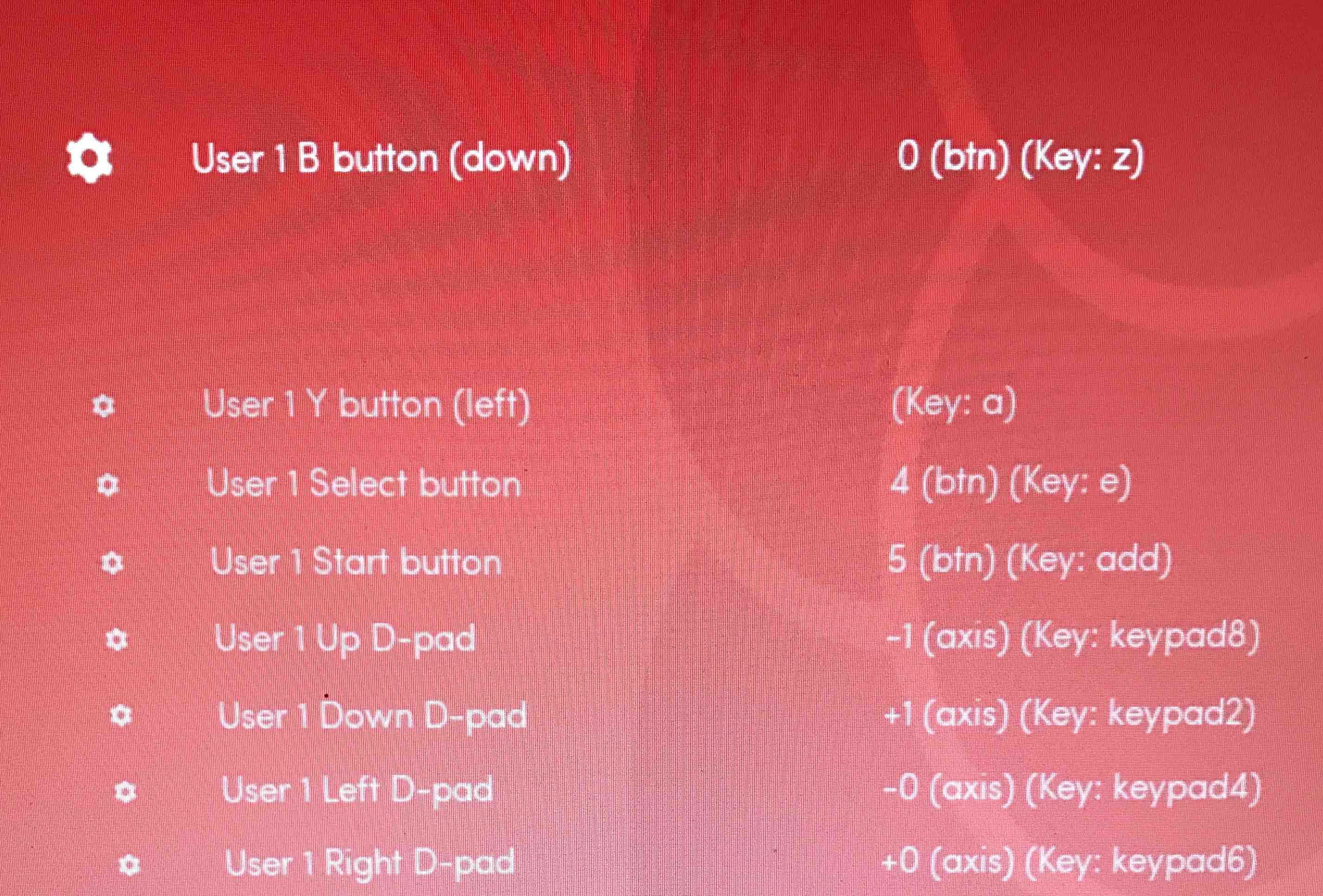
The resulting example in the screen shot below shows for the "up" direction it is now configured to use both (-1 [axis] for the gamepad - 4play) and (key 8 for the arcade joystick - ipac).
I always configured my controls with "autoconfig" disabled as I ran into some issues. I also needed to obviously save the retroarch config file and rename it to the system name (as per the RL requirements).
I have set this up for any system I have controllers for i.e. snes, nes, MD, etc (I have about 50-60 systems setup in hyperspin, but about 10 of them use both the ipac and/or 4-play).
I'm not sure these days if autoconfig has simplified the configuration of controllers but I have happy to do everything manually.
Lastly, I would also manually go through my retroarch configs and remove any keyboard shortcuts e.g. fast forward or volume increase so that it wouldn't conflict with my ipac keys.
I hope this gives you some direction.
Thanks! This all makes sense. Are you not using XBOX360 controllers, as well? If you use RetroPad mapping for BlissBox, it creates issues with XBOX360, since you're changing that mapping... Things get complicated, quickly...
My goal is as follows:
1. RetroArch with keyboard mappings for my arcade control panel
2. XBOX360 autoconfig mappings as standard gamepad controller
3. 8BitDo SNES controller for SNES/NES systems, mapped via xpadder, with RetroArch autoconfigs disabled to prevent conflicts
4. BlissBox NES/SNES/GENESIS etc controllers, mapped via xpadder, with RetroArch autoconfigs disabled to prevent conflicts
The issues I'm running into are:
- Using the custom firmware to stabalize the ports complicates things immediately, because each port has a different USB input name and thus, a single xpadder profile folder won't work.
- To solve that, I created xpadder profile folders, in my xpadder system folder (IE Super Nintendo Entertainment System), for each controller (IE 4PLAY PORT, 4PLAY 2, 4PLAY 3, 4PLAY 4)
- Using this logic, then each folder would contain one "working" profile and 3 blanks. IE 4PLAY PORT's p1 mapping is active, 4PLAY 2's p2 mapping is active, 4PLAY 3's p3 mapping is active, 4PLAY 4's p4 mapping is active. All other mappings are blanks. This SHOULD work. But it doesn't. Instead, RocketLauncher is assinging the profiles in reverse. I'm still uncertain of the cause of this problem.
- As a workaround to the above problem, I created identical profiles for p1, p2, p3, p4 in the 4PLAY PORT folder using the p1 mapping, identical profiles for p1, p2, p3, p4 in the 4PLAY 2 folder using the p2 mapping etc etc. This works, but it's absurdly complicated.
From there, the other issues I'm trying to solve are:
1. Using the above logic, how can I customize the layouts between different joypads. For example, the SNES controller's buttons B and A don't work for Nintendo Entertainment System. Instead, buttons Y and B do. This is obviously due to my xpadder layout for the 4PLAY profiles, but the problem is, we can only use one global profile, since the USB device name is the same, no matter what original controller is plugged into the BlissBox...
PHEW... that was a lot of typing...
Thoughts?
-
I have tried using the jumper method, to fix the issue, as well. No progress...
-
Also, after flashing the custom firmware successfully and experimenting for the last 24 hours, my Port1 just completely disappeared. WTF. Reflashing, following the instructions (press button, plug USB, select firmware and ho
5 minutes ago, ulao said:Did all 4 ports before you used the 4-play fix?
They worked before, and after. Then, the next day, the Port1 disappeared
-
I have like 100 systems and have yet to get the BlissBox functioning to the point that it's worth switching. Once I get the BlissBox going, I'll consider it. Think I need to RMA this one, as Port 1 appears to be bad -- based on the troubleshooting steps provided.
Are you able to do unique layouts, per controller, per system?
IE for Nintendo Entertainment System:
NES controller layoutSNES controller layout
List of MAME clones worth playing - Redux
in HyperSpin
Posted
To reiterate my previous post, this app is tangentially related to the clones worth playing list, in that it allows you to instantly and repeatedly convert a list of clones to parents // and or // remove parents
That's it. Use it as you will, or won't
( :