albert_c
-
Posts
307 -
Joined
-
Last visited
Content Type
Forums
Events
Downloads
Store
Everything posted by albert_c
-
-
1. Stay away from Xpadder now that version 1.06 allows for navigation in the HyperSpin UI. Use the emulators keymapper. 2. To exit an emulator, you can create a global emulator exit command (be sure to enable it or it won't work). Then set all your systems/emulators to use 'Global' for the exit command (they are all set to 'Use Global' by default anyway). This is done somewhere in HyperLaunchHQ>Global>Settings. My emulator box isn't in front of me now, so I can't tell you exactly where it is. 3. As for the slow start, some modules for some emulators have known issues and they are constantly updated. Make sure you update your HyperLaunch files using Git to insure you have the latest modules. Don't use the default download from this forum for installation of HyperLaunch and HyperLaunchHQ. Search this forum for 'HyperLaunch update Git' to find out how to perform the update.
-
Nice work gigapig. I directed the user here from my Youtube video. Was going to help him out, but you are much too quick.
-
Any chance of an out of cycle release to fix this? Hard to play fighting games with this bug.
-
No one has mentioned they use that controller. But I don't see why it shouldn't work with the script. If a cheap $9 Chinese made board works with the script, you should have no problem.
-
First time the issue has been reported that I am aware of. I will see if I can replicate it with two wired X360 controllers. Perhaps it is a Windows 8.1 thing? If makes any difference, I don't see this issue on two other cabs each with a matching set of different controllers. Cab 1: Win7 32-bit w/2 Zero Delay Encoder controller PCB's Cab 2: Win7 64-bit w/2 Akishops PS360+ controler PCB's Each of the cabs can independently control the wheel at the same time. No issue.
-
Get Teamviewer. I have some free time before Thursday Night Football starts. Then message me.
-
No worries gigapig. We are all just trying to help. Seems we are all pretty anxious to do so and are pretty good at it .
-
In HyperHQ, not HyperLaunchHQ. Hit the Default button on this screen.
-
Try one more thing. Default the HyperSpin navigation functions for both 1p and 2p in HyperHQ and give it another whirl.
-
I see that you don't have Intro Video Enabled ticked in HyperHQ. Some users have reported that the script doesn't work unless it is enabled. Or, if it isn't enabled, they have to ALT+Tab to shift focus to HyperSpin before it works (which isn't ideal). Anyways, enable Intro Video. Disable external key mappers in HLHQ and don't start the Xpadder profile in the script. Then give it another whirl.
-
X360 PCB's work great with the HyperSpin Startup Script (known to work the Madcatz Brawlsticks (X360), Microsoft X360 controllers, Akishops PS360+, and MC Cthulhu). So you shouldn't have any problems. Firstly, in HyperLaunch, disable all the external keymapper functions. Then skip Xpadder setup entirely. I think the step that you missed is starting HyperSpin Startup Script to start with HyperSpin. Setting up the ini file with 'Joysticks_Enabled=True' is not enough. Go into HyperHQ in the Startup/Exit tab and browse to the HyperSpin Startup Script.exe file is located and set it to start with HyperSpin. Once done, it should work.
-
You're the third person to have that error. Personally, I can't reproduce it. Perhaps post your ini settings for all 3 programs (HyperSpin Startup Script.ini, HyperSpin Settings.ini, and Xpadder.ini) for ghutch's records.
-
Yeah, that is similar to my buddy's setup. I think his is: Top Row: (Jab)(Medium/Enter)(Fierce) Bottom Row: (Short/Escape)(Forward)(Roundhouse/Favorites) The hardcoded functions produces a non-logical layout on these multi-system PCB controllers. But that doesn't mean it doesn't work, and I would still suffer through that until a future version of g's script gives function mapping (if at all) than use Xpadder. It's only FE navigation afterall. Welp, let us know how it goes once you figure out the focus stealing thing. Hint: I suspect that explorer.exe is what is stealing your focus. Lots of cab builders use taskkill.exe to kill explorer.exe. I think g's script can kill explorer as well with either 'Process_Name_To_Close_1' or 'Item_1_Path' along with the parameters 'Item_1_Parameters'. Just make sure to restart explorer.exe in the script on exit.
-
Here is a program that detects which apps are stealing focus. And here is some discussion on this program. You just need to use it to find out what program is stealing focus so you can shut it down in g's script. Never used it myself, but I thought it would help.
-
Wait, wait, you said cab right? So are you shelling into HyperSpin? All kinds of crazy shieet happens when you shell Windows. Especially, loss of focus in the application that you are trying to control. Is that what is happening to you now; you are required to ALT+Tab to move focus to HyperSpin in order to gain control? If shelling, you are really going to have to roll up your sleeves and get dirty till you find a solution. But what I can suggest is that g's script has the following functions which can help you out: Program_To_Run_Target_1=Your Xpadder profile Program_To_Run_MaxMinHide_=Leave blank rather than Hide as I suggested in the video. Then in Xpadder settings, set it to start minimized as suggested earlier by delexington. Process_Name_To_Close_1 Whatever program is stealing focus when you start HyperSpin, if it is not essential you can enter it here to instruct the script to close it to prevent from it stealing focus. Minimize_Background_Windows_Enabled=True Enable this by setting this to True. If you are shelling, you won't be the first one with this problem so do a Google seach for HyperSpin lose focus, Hyperspin no focus, etc. Also, what is wrong with the hardcoded functions in v.1.06? In my buddy's cab since the PS360+ is being used, the hardcoded functions are arranged in somewhat of an illogical order. But in reality, for simple navitation, the only functions that are essential are Enter, Esc, and Favorites. So it is just a matter of memorizing where those 3 functions are mapped to the 3 buttons on his cab.
-
Was a joke g
-
The HyperSpin functions are hardcoded in this version of the script. I went through when I was setting up my buddy's cab to find out what buttons were what on his PS360+ PCB's. Anyhow, the trick is to figure out which of your buttons are the numeric assignments in Windows Control Panel. So open your control panel>gamepad properties and start pressing the buttons on your stick to find out which buttons on your stick is 1-7. Once you find out which those buttons are, below are the function assignments: Button 1: Enter Button 2: Esc Button 3: Genre Button 4: Roulette Button 5: Skip up Button 6: Skip down Button 7: Favorites Also, make sure if you are using v.1.06 with 'Joysticks_Enabled=True', that you go into HLHQ and disable all the keymapper settings. Not sure what you mean about no control unless you ALT-Tab???
-
I was thinking of updating that video. I don't like how I didn't use Git to install HyperLaunch, I don't like how I wasn't focused with cleaning up the MAME xml file, and of course, version 1.06 of ghutch92's script came out right after. Made the video while laying in bed on my laptop and that missing step you mentioned was an post-production editing error (first time ever using Camtasia). But will wait for the next version of ghutch92's script. Maybe then we will get function mapping. That is cool. Xpadder frustrates me sometimes because I have different issues on different PC's. On one PC, the Xpadder UI will flash each time a profile is being switched, on another, it doesn't. Profiles will switch properly on one PC, on the other it won't. Version 1.06 allowed me to lay Xpadder to rest. Also, sounds like what you discovered is a fortunate bug. Let's hope ghutch92 doesn't patch it .
-
I uploaded version 1.06 into my folder on the FTP.
-
Yeap. It's cool because there are issues using Xpadder that I ran into in different systems. It would work perfectly in my cab, but doesn't work on another PC I am building. Version 1.06 is as close as we will ever get to having HyperSpin having joystick navigation built in. ghutch hard coded the the button functions in this release. Perhaps in a later release we may get the flexibility to map the functions on our own, but even so, it works beautifully now. I looked at your controller PCB's and I suspect that they work fine. My buddy's cab has the Akishop's PS360+ and if those work, I am sure yours will work. The link works here just fine. Weird.
-
You can skip the part of the video from 16:40 (which tells you to plug in your joystikck) up thru 33:47 (which is where you launch the HS Startup Script) for the first time to create the ini file. Basically, this portion of the video covers the Xpadder setup which is no longer needed. Now all you have to do is launch the HyperSpin Startup Script v.1.06 and change this line from: Joysticks_Enabled=False to Joysticks_Enabled=True Make sure you set HyperHQ to start this program when you launch HyperSpin still and let us know if that works for you. In my case, I have 2 Zero Delay encoder boards for my cab and this script allows for both 1p and 2p to be able to navigate the HyperSpin front end. ghutch did some awesome work with this. The only issue I found is that the button assignments are premapped, but once I figured out the mapping, I just had to relearn which button did what. No biggie.
-
It's in the first post on this page right under the picture of the X360 controller.
-
I made that video a month ago, but it is already out-dated. With version 1.06, you don't need to mess with Xpadder at all. Actually, this version doesn't support a keymapper at all. You just need to set 'Joysticks_Enabled=False' to 'Joysticks_Enabled=true'. See if that works for you. And out of curiosity, which joystick/controller pcb are you using?
-
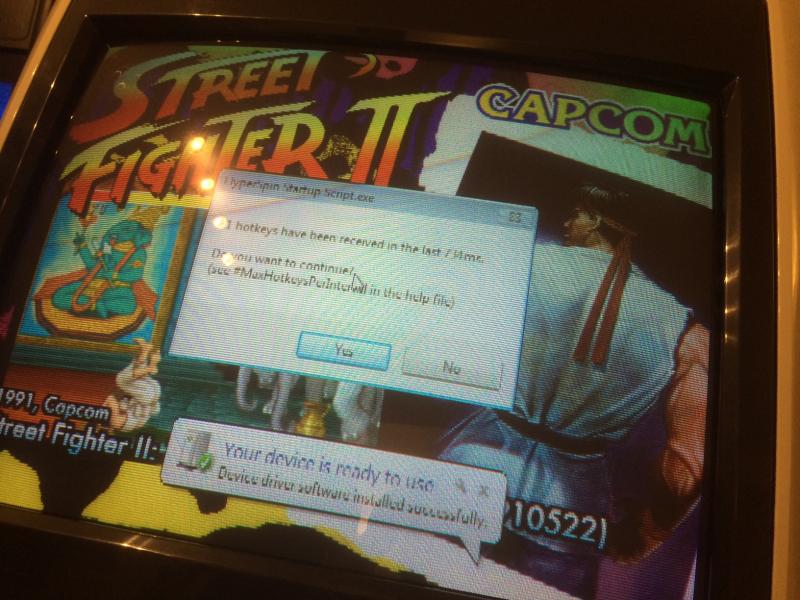
Was playing SF2 and got knocked dizzy. Began button mashing to wake from the dizziness when I encountered this message: "71 hotkeys have been received in the last 714ms. Do you want to continue? (see #MaxHotkeysPerInput in the help file) YES/NO" Focus switched to the HyperSpin FE, I selected enter at the prompt, then had to ALT+Tab to get back to MAME. Anyway to disable this? From time to time button mashing is going to be required for playing games. BTW, I can confirm this works perfectly with these controller boards: -Zero Delay Encoder -Zero Delay Rematch/PS3 Encoder -Akishops Custom PS360+