Circo
-
Posts
1,619 -
Joined
-
Last visited
-
Days Won
24
Content Type
Forums
Events
Downloads
Store
Everything posted by Circo
-
All you have to do is put a different video into the media overrides folder. (HyperSpin Folder)/Media/(System Name)/Video Snaps - System Any video in there will override the default. More than one should randomize.
-
We have a pretty substantial update for the Nintendo Entertainment System video snap collection today. 606 new videos were added bringing the total to 1,885 videos. Most of these fill in the aftermarket, pirate & unlicensed and a few retail that have been added but were missing. Almost all captures were done using a mister FPGA unit and hardware capture. Big shout out to @ChrisL559 for helping with the capture process. All videos av available via EmuMovies Sync. What's New [File List] Nintendo Entertainment System (Video Snaps)(HQ)(No-Intro)(EM 2.5).txt Links: EmuMovies Website (SQ240 Only) Directly through your front-end or our app using EmuMovies Sync (HQ480 & SQ240) EmuMovies File Server (FTP) (HQ480 & SQ240) View all our updates on the EmuMovies Files Feed (We only post a handful in the news feed) View the full article
-
- 4
-

-

-
The next public release is almost here with a ton of bugfixes, i have passed this on
-
Just saw the preview of what I think is this weeks next public release and the uninstalled covers this now.
-
Reset HS2.zip Here is a small utility that will clean up the databases and everything after an uninstall.
-

New Member Hoping for some HyperSpin 2.0 Direction
Circo replied to JohnnyChimpo's topic in HyperSpin General
It's that download link right up top there on the sites menu. The getting started part of the docs should also be helpful: https://docs.hyperai.io/docs/hyperhq/getting-started The old download section does not have any hyperspin 2 stuff in it. -
That actually is focus in the original picture not upscale, the lens was focused on b with an aperture of about 1.4 so extremely tight, briging everything outside of that further and further out of focus.
-
Just saw a video demo of the fix (plus a bunch of tweaks because frosty is insane) bug will def be squashed in the next update +
-
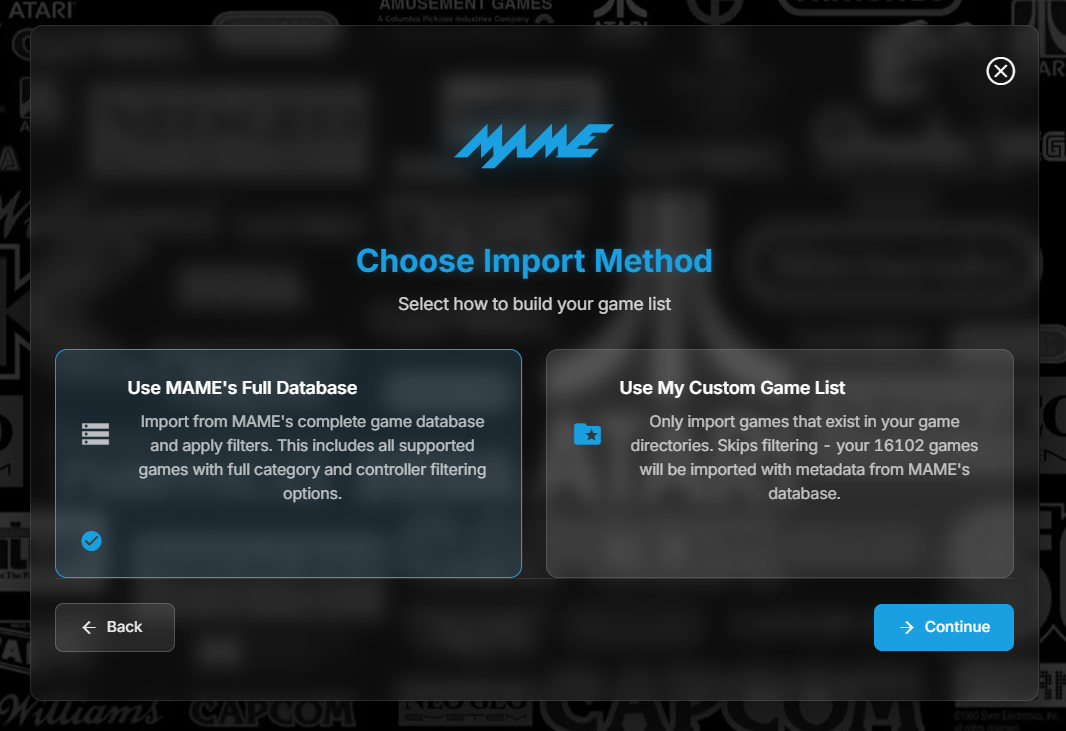
Import option 1 assumes a full mame rom set of any type. If you have pre filtered or customized your Roms set in any way then use option 2.

-
Sounds like a scroll bar is missing, can you please attach a screenshot?
-
@fr0stbyt3 posted over at EmuMovies here. https://emumovies.com/forums/topic/70373-hyperhq-unable-to-login-to-emumovies/?do=findComment&comment=89288 The new build (2.0.137) is up now. Restart HQ and it should prompt you or download the latest from the download link on the website. Let me know if you run into any more issues!
-
It’s looking like login works inside the program just fine, there is an issue with the wizard. And yes skip is missing. @fr0stbyt3and crew should have it sorted soon.
-
Should be fixed in the new release:
-
This post was an earlier similar but separate issue Tomorrows release is in testing.
-
That text file that says put override media here means just that. Any media you put there will replace the default media that comes from EmuMovies. Everything HyperSpin downloads goes into the HSM folder and is not user editable
-
In the plugin there is this super fancy new mame installer, set to do all kinds of filtering and eventually populating collections and other systems…. BUT…. Support for a custom mame set (non-fancy, just a few roms) isn’t currently there. I’m sure it will be but right now, that’s what’s causing your problem. Probably more of an oversight than anything.
-
We will get this figured out I sent a note to the dev team to come take a look at this. Couple of questions: What systems do you have installed in HyperHQ? Are you seeing any related errors in the log viewer? (See Below) Best to get some details to troubleshoot this faster. Since it wasn't mentioned, until you have setup a System in HQ nothing will populate in HyperSpin. IE, if you did a fresh install and then went to hypertheme and clicked download on the snes theme, it wouldn't populate. The system and games need to be set up and then the default theme will populate and that can be changed in HyperTheme. Can you provide a screenshot of what you see in the systems/game view of Hyper HQ? If you haven't seen it yet, check out the getting started guide and see if there is anything that stands out. https://docs.hyperai.io/docs/hyperhq/getting-started EDIT: Spoke with @fr0stbyt3 and he discovered that logging for HyperSpin is disabled in error, and though there is a checkbox to enable it, that is in the wrong place (beta problems) .
-
@TrnzaddictThere are going to be two types of import when it’s final. One that supports a full mame rom set split/merged/non-merged (most common) and a secondary import type for your curated rom set (less common) Talked with frosty, main reason for two types is if your using a full romset but want arcade only, hs will still be able (optionally) to create any available subsystems through the collection system ie game and watch, jakks pacific, etc and you can turn them on to have more wheel systems. (Probably a month out or so) that secondary import hasn’t been added to the plugin yet.
-
Sending this to the dev team thank you
-
There is a new release of the mame plugin for the next build. Couple more days, right after Christmas I was told. The testing team had oodles of feedback.
-
Something triggered a block, it's working now
-
@Hald2kWe had this alot in testing. It's a byproduct of different media systems. This is a good time for fresh install, and by fresh I mean all the way fresh. Go into c:/users/username and delete the .HyperHQ and .HyperSpin folders etc. Then when you reinstall its going to build 100% new databases etc. I think this is the full list, havent had to do it in awhile now. c:/users/username/appdata/roaming/HyperHQ c:/users/username/appdata/roaming/HyperSpin c:/users/username/.HyperHQ c:/users/username/.HyperSpin I think that this is everything and you shouldn't have to do this again in the future. Let me know how you get on
-
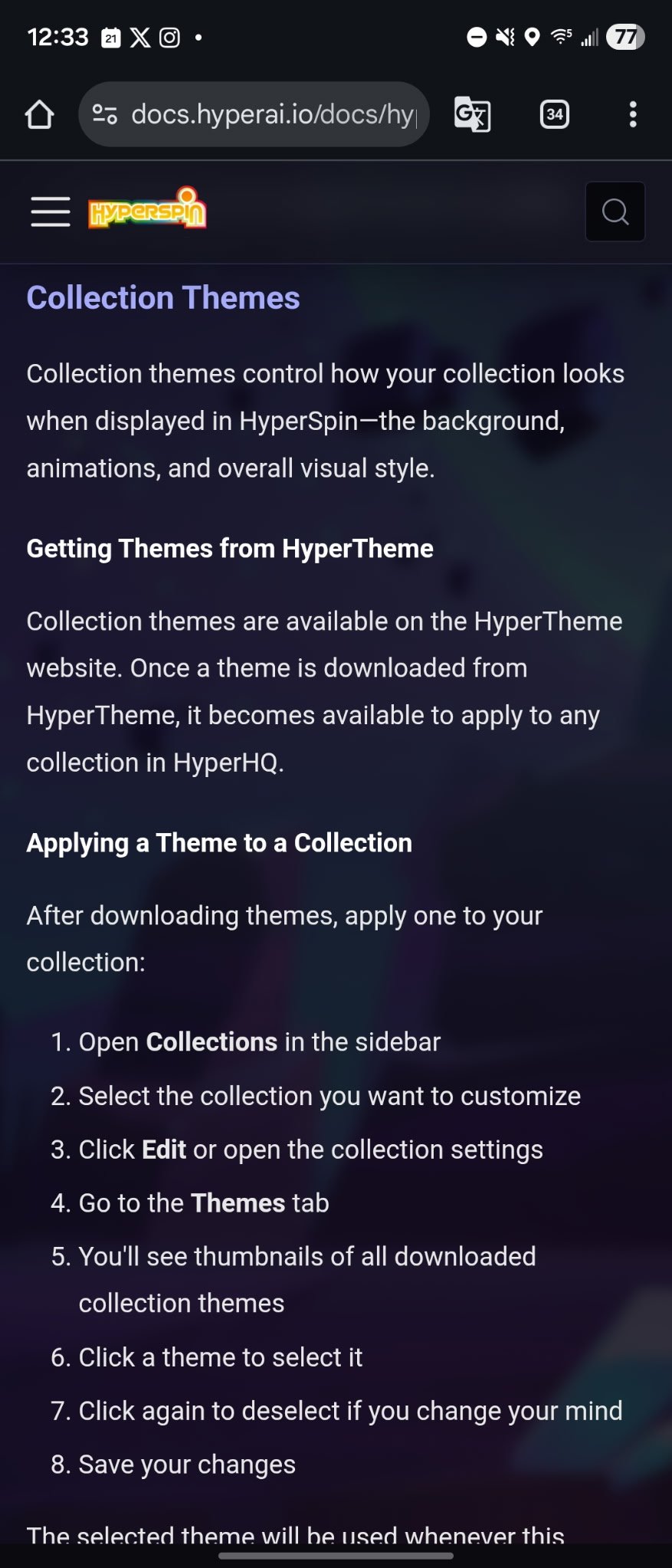
Here you go @Fraggle99: https://docs.hyperai.io/docs/hyperhq/creating-collections/#collection-themes
-
Good news pleasuredome is not gone still active and they keep up with mame releases primarily only. Just google the word they are based on GitHub now I think but super easy to always get the latest mame version.
-
Yessir https://docs.hyperai.io/docs/hyperhq/getting-started