gigapig
-
Posts
9,589 -
Joined
-
Last visited
-
Days Won
27
Content Type
Forums
Events
Downloads
Store
Everything posted by gigapig
-
If want help firstly DON'T be rude. Secondly your post has absolutely no information on it and is quite pointless. Now you're going to spend more explaining yourself.
-
Create a thread and cross your fingers; )
-
If everything on your end is working then no, enjoy what you have created. However if you keep updating via GIT then i don't think you'll be able to keep up to date. If you get problems in the future and you ask for help then you'll probably be required to update and RocketLauncher won't be supported.
-
http://www.howtogeek.com/96298/assign-a-static-drive-letter-to-a-usb-drive-in-windows-7/ I know we have discussed this over pm so if anyone has any thoughts please chime in. When you plug in any drive it will be assigned a drive letter so choosing one that is rarely used (lower down the alphabet ) would be a good idea. Have you actually tried HyperSpin on a flash drive if so what happened? HyperSpin does have any paths assign to it in any ini file that i know other than maybe RocketLauncher. All emulators can be relative so that shouldn't be a problem. The only issue i see is HyperSpin being really slow on a flash drive.
-
The Randomiser is working fine, I have not changed anything my end and it, works as it did. HyperSpeech will now only read sub wheel names etc, this is down to the latest HyperSpin beta and not RocketLauncher. It may be fixed in another update or Boogie may need to make changes; I have heard he is aware of this. Please follow the beta thread for more info. The other two I don't use but I believe the authors are aware of the changes they need to make.
-
Welcome to the forum Kakamingas. There have been some big changes recently and people are probably trying the catch up. HyperLaunch is now called RocketLauncher and the downloads you seek are here. You will need the RockerLauncher v1.0 full install and the Base Media Pack. The Transition packs are only for people who have HyperLaunch/RocketLauncher already installed.
- 270 replies
-
- 2
-

-
- guide
- hyperlaunch
- (and 3 more)
-
Thank you DJ & brolly
-
CraigandJames, do you have and bluetooth, Dolphin bar or Wiimotes connected? Sounds like similar symptoms.
-
Nope, this one was put together due to the departure of HyperLaunch. There is no need for you to install it. @stucazzo Just hover your mouse pointer over the exe. The exe in the 1.3.3.0 download is still 1.3.2.
-
It appears that the 1.3.3.0 version of HyperSpin is causing a few issues for our newer members. Version 1.3.3.0 comes with the older version 2 of HyperLaunch in the root of HyperSpin and also contains the older modules. If you have an older set up or you know your way around this version, then please go ahead and use it. If however you've never used HyperSpin before and you want to be able to follow the new guides etc then here's what you need to do. Download HyperSpin from the downloads section. Download HyperLaunch from here. Follow a guide to install the software, either this guide or follow a video .If when you run HyperLaunch HQ you see no systems in the left pane, follow this .To keep HyperLaunch up to date follow this guide. Finally if when you run HyperSpin and launch a game you get a "cannot find HyperLaunch.exe" please change the path to HyperLaunch, you can do that by opening the settings.ini in Notepad. Navigate to the :HyperSpin\Settings folder and open the settings.ini file. You should see this. [Main] Menu_Mode=multi Single_Mode_Name=MAME Enable_Exit_Menu=true Enable_Exit=true Exit_Default=yes Exit_Action=exit Version=1.0.0.0 Last_System= [b]Hyperlaunch_Path=[/b]C:\HyperSpin\HyperLaunch\ [Resolution] FullScreen=true Width=1024 Height=768 Scanlines_Active=true Scanlines_Image=scanlines_ag Scanlines_Scale=1 Scanlines_Alpha=0. Change the highlighted path accordingly to where you installed HyperLaunch which is normally, C:\HyperSpin\HyperLaunch\ If I've missed anything or anyone has any additional info they would like to add, please post. Thanks.
-
Yes, same problem.
-
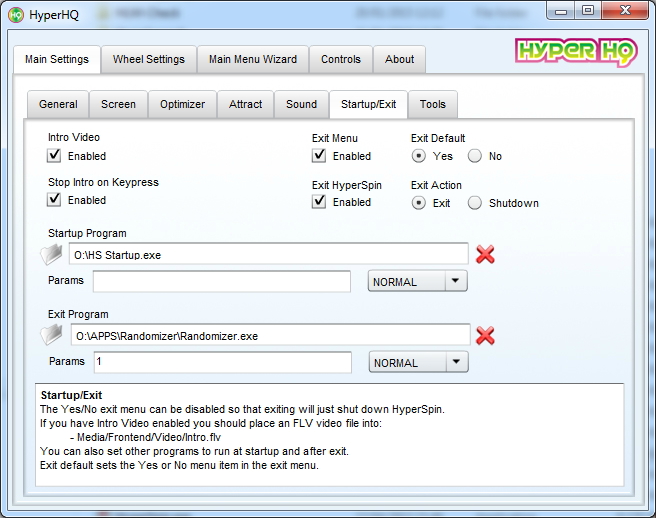
HyperHQ is the gui for HyperSpin HyperLaunch HQ is the gui for HyperLaunch. Goes in Startup Program.

-
I think customizable controls are coming.
-
So that's antivirus software that stops you downloading what you want and doesn't tell you why or gives you any notification just a php? I'm glad I'm not using that.
-
Ghutch really should change this quote, "this is not really anything amazing or great" well I and I'm sure many others would disagree. It fixes (in an indirect way) one of the main complaints about Hyperspin, the Gamepad bug which kind of forces you to have to buy another program (xpadder) for $9.99. Perhaps it's still a beta but he should really promote it and get it stickied or something.
-
I can't believe I'm explaining this, but I suppose the first post doesn't have the info you need? The script will let you control Hyperspin without the use of xpadder, just like it should be. You can use an Xbox 360 pad and use the analogue sticks to control the wheel, a full button layout is on the first post. It can also hide background windows etc. It's well worth trying out and would get rid of xpadder for many who use it just to control Hyperspin. EDIT: Ghutchs' description is a little ambiguous.
-
Another one done. Why is that happening? I can download it fine.
-
Done.
-
If you still need to know, I got my Dolphin bar yesterday and I like it so far. The Wiimotes connect real quick and I can now use my Walther P99 with more than just the Console. However, the issues I had with the wheel spinning wildly are the same, so I have to switch back to the older version of the Startup Script.
-
Did you install the drivers for the controllers?
-
On windows 7 having 2 controllers (mine are wireless) switched on allows both controllers to have the same functions and control, so both can change volume and both can probably start a game. Your specific problem relating to volume is this. If player 2 moves the right stick on the y-axis (up and down) the volume bar pops up, to be able to change the volume they need to move the left stick on the y-axis (up and down) which obviously you are try to control the wheel with, but left stick control has been handed to the volume function. Same thing for the D-pad. I suggest asking your 6 year old to get you a beer while you choose the next game
-
Sorry, just remembered, can't you just set keymapper to false for each system?
-
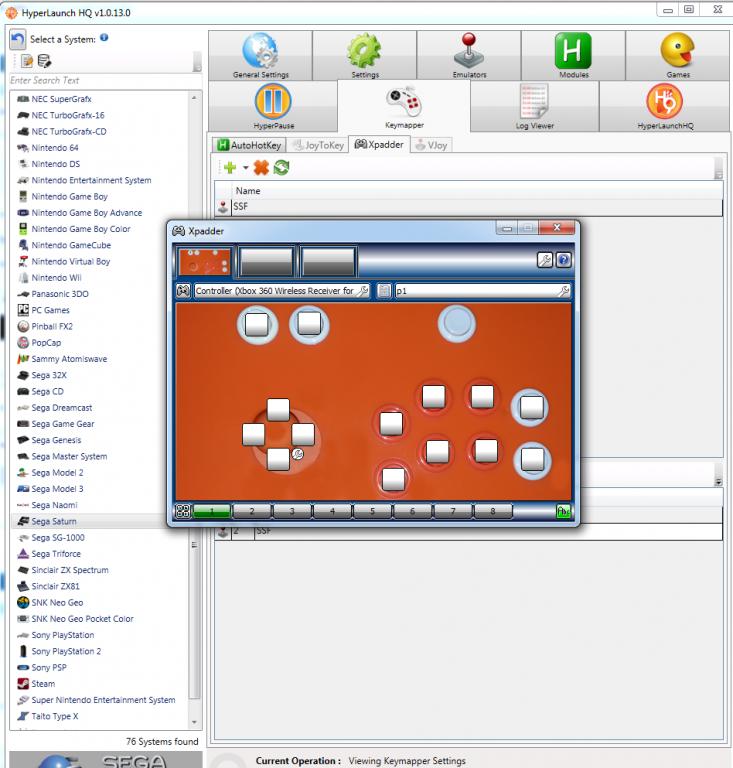
Sorry for the cross talk, I'll let Albert continue. You don't disable it, you can set Hyperlaunch to load a blank profile, as I have here for Sega Saturn.
-
That is the same symptoms I have with having a Wiimote connected, and it continues even if I switch it off, the only way I can clear it is reboot. I now have Joysticks set to false, and I use Xpadder as I did before, but I still use the Startup script to hide windows, which I love and need.
-
Any Wiimotes connected, other controllers or Bluetooth?