


reznnate
-
Posts
657 -
Joined
-
Last visited
-
Days Won
8

















reznnate's Achievements






-

HyperspinFE beta7 bug reports and feedback
reznnate replied to reznnate's topic in HyperSpin Android
I've fixed several bugs related to startup (black screen) on various gpus, storage cache index issues, etc. I've added full support for HS1 fonts, override fonts per wheel, and HS1 genres support (including main menu wheel for those of us testing with 500+wheels). Beta 8 will ship in the next week or two and if I don't receive many bug reports or feature requests, I'll move onto the linux build. -
I should probably create a video explaining the new features... No one reads instructions anymore.
-
Which build of Hyperspin? (beta 7)? Which device are you using? Is this the windows build? Force-close your app and restart fix? Reboot device fix it? Change image quality setting to 'default' from med/high? I have an updated beta8 release coming in the next week or two that fixes some bugs but I haven't seen that one yet.
-
HyperspinFE beta7 bug reports and feedback
reznnate replied to reznnate's topic in HyperSpin Android
I updated the wheel-copier app. While creating various uSD cards for myself, I found and fixed some annoying bugs. Also worth noting.... these storage saving features can be huge: --base wheel media - only copies the media files needed for base hyperspin. Manuals, Bezels, and other folders are ignored (this is visible in folder browser) --minimal main menu media - my source main menu folder is 55GB. This only copies the media needed for the folders you select. I should probably change this default to ON always. --only only media with roms - this for CD/DVD based systems and can save a ton of space for huge systems like PS1 and PS2 -
HyperspinFE beta7 bug reports and feedback
reznnate replied to reznnate's topic in HyperSpin Android
It should be working. It works for me. It keys off of this parameter [video defaults] path=D:\arcade\Media\MAME\Video\ -
Starting a new thread I'll be following for when bugs are found. I'm sure I missed a few.
-
This device? https://www.gsmarena.com/xiaomi_pocophone_f1-9293.php Old version of Android is concerning but the fact it's not crashing and allowing you to enter app GUI makes me think it may actually be a conflict with your setup. First thing, I'd try deleting (moving) your old Settings_Android/ folder because they share nothing in common with the old app. A quick way to test your setup (vs device) compatibility is with Windows build I posted. Drop it anywhere and use -d "<Hyperspin folder path>. So far I've only tested on Shield, FireTV 4K, Anbernic RG477M, Retroid 3 (I think), and I've ordered the Ayn Thor (hasn't arrived yet). Current build is 64b only and doesn't work on the Shield Tube (for example).
-
I posted a few apps I built for myself. The first is the wheel editor I used to make the different wheel designs and mimic Hyperspin wheels. The second is a file selector/copier I use to copy certain wheels from my main 500-wheel setup to smaller sized storage for my Android handhelds. I've got one uSD with old retro cart-based systems and then I've got a bunch of others for each of the DVD/GDROM/CD-based systems and I use the rom-picker to be more selective about the games I want to carry around (and fit).
-
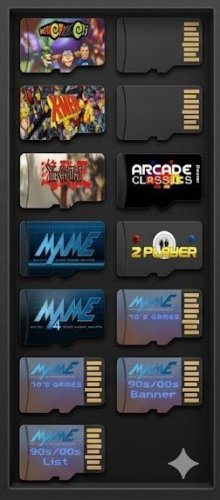
Hyperspin wheel copier View File Sharing an app I made for myself. I use it to make "sub-wheel versions" of my main 22TB Hyperspin drive to various smaller uSD cards. It allows me to carefully fit the specific wheel media + roms I want and target various sized storage devices. Submitter reznnate Submitted 05/29/2026 Category HyperSpin (Android) File Count 1 Credits Reznnate
-
Version 1.0.0
4 downloads
Updated b8 with bugs fixes Sharing an app I made for myself. I use it to make "sub-wheel versions" of my main 22TB Hyperspin drive to various smaller uSD cards. It allows me to carefully fit the specific wheel media + roms I want and target various sized storage devices. This only copies media and rom folders, it doesn't mess with Windows emulators or Rocketlauncher folders. hyperspin-wheel-copier_b8.exe -
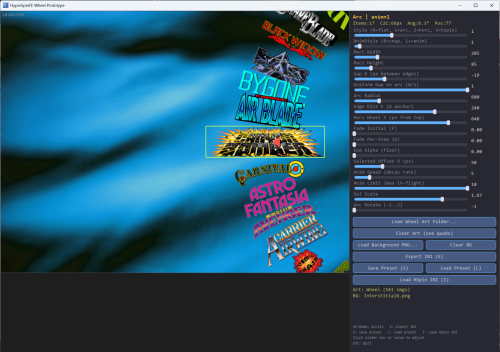
Wheel editor/visualizer tool View File Allows you to create different wheel designs in the case existing wheels aren't lining up, etc. Submitter reznnate Submitted 05/28/2026 Category HyperSpin (Android) File Count 2 Credits Reznnate
-
Version 1.0.0
23 downloads
Allows you to create different wheel designs in the case existing wheels aren't lining up, etc. -
Another suggestion for those dusting off old HS1 hard drives or NVIDIA Shields or whatever, the pain and suffering related to Hyperspin setup and tuning and fixing and renaming is a different ball game now. Use ChatGPT. I've started building a NEW setup (crazy, I know...), and I've been using AI to 'make me a dbase xml file matching these roms', 'identify missing assets', 'create wheel art for xyz game'. etc. etc..
-
Oh, one more tip I used while testing Windows version. You can drop the files into a separate folder and use -d <hyperspin path> such as "C:\hyperspinfe_desktop.exe -d G:\Hyperspin". This allowed me to easily test different builds of Hyperspin wheels and themes. It will create /Settings_Windows folder with modified settings and new feature parameters, wheel indexes and such. Just wipe the folder or any separate files if you want to 'reset'.
-
While Shield is the ideal form factor device IMHO, the updated app also runs on other Android gaming handhelds, tablets and phones now although I've only debugged and tested a few so far. The vast majority of my performance and play-testing has been on NVIDIA Shield. Let me know if you find bugs or problems.

