
Avar
-
Posts
2,194 -
Joined
-
Last visited
-
Days Won
6
Content Type
Forums
Events
Downloads
Store
Everything posted by Avar
-
Hopefully. I'm sure I'm missing details here and there but if I catch the broad strokes it shouldn't matter. Once this is done it'll be easy to check assets against at least. Quiick note to everyone in case I didn't mention it yet: I know there's stuff in Upload Here I haven't included yet. Reason being's that I don't wanna get it mixed up so I'm doing all of the official, then all of the Upload Here upgrades. However, still please don't hesitate to point things out like @rodrigodn did earlier as it helps me immensely and we'll ultimate have the best results. Cheers!
-
Atari Lynx added. Some major issues with what would otherwise appear to be a relatively clean set: Cart style: There isn't a single cart style shared by all Atari Lynx games afaik. See notes below. http://atariage.com/forums/topic/141573-the-definitive-lynx-cart-variation-list/ Themes are a lil fugly, mostly due to the background we've been using for this for the last decade. Some wheels need a touchup and some were lifted from systems where the games' art/logo was completely different Eg. Klax EmuMovies issue: Atari Lynx is 1.57:1, not 4:3. All previews are 4:3. http://www.gamesasylum.com/2012/10/26/the-exciting-world-of-handheld-aspect-ratios/ Atari Lynx Backgrounds: Not system specific Default (HD)(4:3) Default (HD)(16:9) Boxes: *Can someone confirm that all Atari Lynx boxes share the same side-style like this? Can't find anything disproving that's the case. HA! GET IT?! THE "CASE!" IT'S A PUN! Default 2D (4:3) *Scans of damaged box fronts Default 2D (16:9) *Scans of damaged box fronts Default 3D (4:3) *Some low quality and need re-draw Default 3D (16:9) *Some low quality and need re-draw Boxes - Backs: Carts: Atari Lynx carts have a wide variety of styles. These images look good but they're not historically accurate so I'm forced to mark them red: Reference http://atariage.com/forums/topic/141573-the-definitive-lynx-cart-variation-list/ Default 2D (4:3) Default 2D (16:9) Genre Backgrounds: *Not system specific Default (SD)(4:3) Default (HD)(4:3) Default (HD)(16:9) Genre Text: Genre Wheels: * Not system specific Default (4:3) Default (16:9) Letters: Default (4:3) *Dunk3000 Default (16:9) *Dunk3000 Digitize (4x3) Digitize (16x9) Marquee: Marquee (Default): Pointer: Default (4:3) *ninja2bceen Default (16:9) *ninja2bceen RL: Sound - Background Music: Sounds - Background Music (Default): Sounds - System Exit: Sounds - System Start: Sounds - Wheel Click: *Not system specific Default Sound - Wheel Sounds: Sound - Wheel Sounds (Default): SpecialA1: *Not system specific Default (4:3) Default (16:9) ninja2bceen - Clock (16:9) Xbox (16:9) SpecialA2: *Not system specific Default (4:3) Default (16:9) SpecialB1: *Not system specific Default (4:3) Default (16:9) PlayStation (16:9) Xbox (16:9) SpecialB2: *Not system specific Default (4:3) Default (16:9) SpecialC1: SpecialC2: Themes: Themes (Default): *background we've been using for this system is kinda ugly as piss Default (SD)(4:3) *Boxes in Artwork3, Carts in Artwork4 Default (HD)(4:3) *Boxes in Artwork3, Carts in Artwork4 Default (SD)(16:9) *Boxes in Artwork3, Carts in Artwork4 Default (HD)(16:9) *Boxes in Artwork3, Carts in Artwork4 Themes (Main Menu): Chip (HD)(16:9) *SWF'd w/o smoothing. SD content in an HD package Default (SD)(4:3) Default (HD)(4:3) Default (SD)(16:9) Default (HD)(16:9) Transitions: Transitions - Override: Wheels: *Some are a lil rough and there are instances of art lifted from other systems even though it doesn't match Eg. Klax Default (4:3) Default (16:9) Lynx (4:3) Lynx (16:9) Additional note: The aspect ratio of the Atari Lynx is 1.57:1, not 4:3. As suck, this system will remain red until proper AR video previews are available.
- 288 replies
-
- 5
-

-
- koolaid man
- media
- (and 2 more)
-
@rodrigodn Awesome, thank you very much. Guessing those weren't on the FTP or upload section so if you didn't post I'dve likely never found them. Replaced the default wheels with all of your TM removed ones as well. Cheers! Easy to catch TM n R on system wheels and theme logos but notsomuch on game wheels
-
@ninja2bceen I did some digging and found em. I'll make a black border for the jag ones @diskmach I figured haha it's not so bad except when it's in a SWF I've gotta decompile.
- 288 replies
-
- 1
-
-
- koolaid man
- media
- (and 2 more)
-
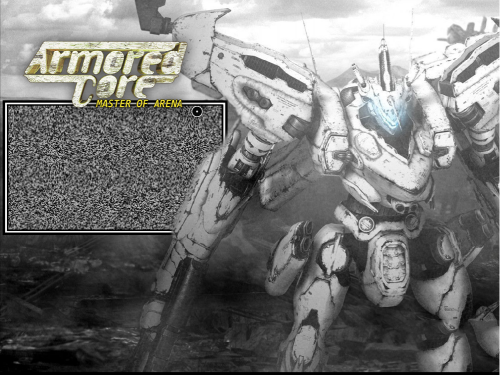 Love that you made a separate one for Disc 2!
 -
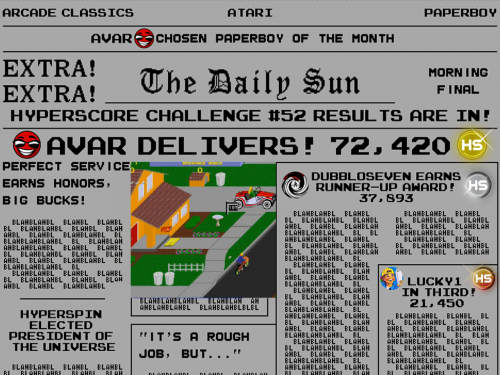
Version 1.0.0
48 downloads
Themes include Background Music mp3. Follow readme instructions for extraction -
Atari Jaguar CD added. Same deal with pointers. Missing all media for Robinson's Requiem (USA) (Unl), a title that was never officially released but eventually released by the developed unofficially. It -does- have box/disc art but doesn't seem to have been dumped yet despite seemingly being on ebay for a not-bad price. System Yellow'd once media for this game is provided; Green'd once better quality discs are made and non-batched 3D boxes are done. Atari Jaguar CD Backgrounds: Not system specific Default (HD)(4:3) Default (HD)(16:9) Boxes: *Missing Robinson's Requiem (USA) (Unl) Default 3D (4:3) *2D art batched onto generic "3D" sides Default 3D (16:9) *2D art batched onto generic "3D" sides Boxes - Backs: Carts: *Missing Robinson's Requiem (USA) (Unl) Default 2D (4:3) *Some discs have a few rows of pixels shaved off the tops and bottoms, no alpha in the plastic parts that should be transparent. Default 2D (16:9) *Some discs have a few rows of pixels shaved off the tops and bottoms, no alpha in the plastic parts that should be transparent. Genre Backgrounds: *Not system specific Default (SD)(4:3) Default (HD)(4:3) Default (HD)(16:9) Genre Text: Genre Wheels: * Not system specific Default (4:3) Default (16:9) Letters: Default (4:3) *Dunk3000 Default (16:9) *Dunk3000 Marquee: Marquee (Default): Pointer: *White border is out of place and contrasts poorly with the system's aesthetics Default (4:3) *ninja2bceen Default (16:9) *ninja2bceen RL: Sound - Background Music: Sounds - Background Music (Default): Sounds - System Exit: Sounds - System Start: Sounds - Wheel Click: *Not system specific Default Sound - Wheel Sounds: Sound - Wheel Sounds (Default): SpecialA1: *Not system specific Default (4:3) Default (16:9) ninja2bceen - Clock (16:9) Xbox (16:9) SpecialA2: *Not system specific Default (4:3) Default (16:9) SpecialB1: *Not system specific Default (4:3) Default (16:9) PlayStation (16:9) Xbox (16:9) SpecialB2: *Not system specific Default (4:3) Default (16:9) SpecialC1: SpecialC2: Themes: Themes (Default): Console (SD)(4x3) *Discs in Artwork2, Boxes in Artwork3 Default (SD)(4:3) *Discs in Artwork4, Boxes in Artwork3 Default (HD)(4:3) *Discs in Artwork4, Boxes in Artwork3 Default (SD)(16:9) *Discs in Artwork4, Boxes in Artwork3 Default (HD)(16:9) *Discs in Artwork4, Boxes in Artwork3 Themes (Main Menu): Avar (HD)(16:9) Default (SD)(4:3) Default (HD)(4:3) Default (SD)(16:9) Default (HD)(16:9) Transitions: Transitions - Override: Wheels: *Missing Robinson's Requiem (USA) (Unl) Avar - Jaguar(4:3) *Missing Robinson's Requiem (USA) (Unl) Avar - Jaguar (16:9) *Missing Robinson's Requiem (USA) (Unl) Default (4:3) *Missing Robinson's Requiem (USA) (Unl) Default (16:9) *Missing Robinson's Requiem (USA) (Unl)
- 288 replies
-
- 5
-
-
- koolaid man
- media
- (and 2 more)
-
Atari Jaguar added. System red primarily for missing Unl wheels. Can be upgraded to Yellow with completed wheels, green with completed wheels, new pointers, and mebbe some Unl "box" + "cart" art for the 2x unl games listed. @ninja2bceen, as per the notes, do you still have your PSDs for these pointers? The pointers are perfect but the white doesn't go with the system/theme aesthetics. Could I trouble you for a dark-border alternate, if you have time? Cheers! Side note: This system took like... 3 gd hours cuz apparently none of us, myself included, noticed we'd left the (TM) on the logo so I had to manually remove it from every main menu wheel set and every main menu/system theme @_@ Atari Jaguar Backgrounds: Not system specific Default (HD)(4:3) Default (HD)(16:9) Boxes: *Nothing for 2x (Unl) titles but not necessarily required. Default 3D (4:3) *Black Hazor *Missing Breakout 2000 (World) (Unl) and Jaguar Hockey (World) (Unl) Default 3D (16:9) *Black Hazor *Missing Breakout 2000 (World) (Unl) and Jaguar Hockey (World) (Unl) Boxes - Backs: Carts: *Nothing for 2x (Unl) titles but not necessarily required. Default 2D (4:3) *Black Hazor *Missing Breakout 2000 (World) (Unl) and Jaguar Hockey (World) (Unl) Default 2D (16:9) *Black Hazor *Missing Breakout 2000 (World) (Unl) and Jaguar Hockey (World) (Unl) Genre Backgrounds: *Not system specific Default (SD)(4:3) Default (HD)(4:3) Default (HD)(16:9) Genre Text: Genre Wheels: * Not system specific Default (4:3) Default (16:9) Letters: Default (4:3) *Dunk3000 Default (16:9) *Dunk3000 Marquee: Marquee (Default): Pointer: *White border is out of place and contrasts poorly with the system's aesthetics Default (4:3) *ninja2bceen Default (16:9) *ninja2bceen RL: Sound - Background Music: Sounds - Background Music (Default): Sounds - System Exit: Sounds - System Start: Sounds - Wheel Click: *Not system specific Default Sound - Wheel Sounds: Sound - Wheel Sounds (Default): SpecialA1: *Not system specific Default (4:3) Default (16:9) ninja2bceen - Clock (16:9) Xbox (16:9) SpecialA2: *Not system specific Default (4:3) Default (16:9) SpecialB1: *Not system specific Default (4:3) Default (16:9) PlayStation (16:9) Xbox (16:9) SpecialB2: *Not system specific Default (4:3) Default (16:9) SpecialC1: SpecialC2: Themes: Themes (Default): Default (SD)(4:3) Default (HD)(4:3) Default (SD)(16:9) Default (HD)(16:9) Themes (Main Menu): Avar (HD)(16:9) Default (SD)(4:3) *Donald Default (HD)(4:3) Default (SD)(16:9) Default (HD)(16:9) Transitions: Transitions - Override: Wheels: Avar - Jaguar(4:3) *Missing Breakout 2000 (World) (Unl) and Jaguar Hockey (World) (Unl) Avar - Jaguar (16:9) *Missing Breakout 2000 (World) (Unl) and Jaguar Hockey (World) (Unl) Default (4:3) *Missing Breakout 2000 (World) (Unl) and Jaguar Hockey (World) (Unl) Default (16:9) *Missing Breakout 2000 (World) (Unl) and Jaguar Hockey (World) (Unl)
- 288 replies
-
- 4
-

-
-
- koolaid man
- media
- (and 2 more)
-
OP amended to remind people to always remove (R) and (TM) logos. Just randomly caught an instance of a default logo slipping through with one, which then carried on to almost every wheel set that used that system XD Will continue to check for this as I go and correct accordingly.
-
Added example images to clarify certain points. If anyone can think of any additional points/tips or useful imagery, please let me know. Artists feel free to use this thread to keep newcomers in the loop when it comes to useful tools/techniques
- 4 replies
-
- 1
-
-
- wheel
- guidelines
- (and 2 more)
-
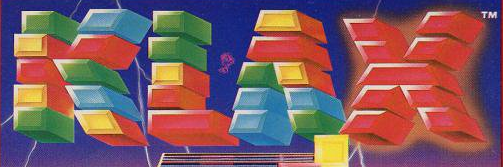
In an effort to provide clearer ongoing art direction, this thread will serve as a quick reference for wheel creation best practices. Media Type(s): Main Menu System Wheels, System Sub-Wheels, Game Wheels, Genre Wheels, the Wheels on the Bus. Minimum Width: >1080p: 400px 4K: 800px 8K: 1600px Note: There is no height limit, just use common sense. 175px/350px/700px is a good general guideline for 1080p/4K/8K but this can be deviated from if a given logo has abnormal dimensions and you feel the aethetic would be improved by a non-standard wheel dimension. Note: Ideally you'll wanna draw/redraw and touch these up at hella high resolution (the most your sanity or computer can handle) and downsample to the resolution required for a given format. This maximizes quality while minimizing the possibility that anyone will have to redo the work in the future. 8K is a good "future proof" minimum standard to hold yourself to as a general best practice. Best Practices and Standards: When transferring a wheel that already exists for another system, verify that the art is actually the same. Some games have different art for different systems. Here's an example: General Klax wheel: Actual Klax art as it appears for the Atari 2600: Totally different, and Klax is a good example of a game that has completely different art on almost every system it's on. While I encourage laziness, please be vigilant and make sure the art's actually the same before copying it from another system. The same goes for games that have different logos in different regions. If you see that art already exists, don't immediately assume that art will be the same across all regions/systems. Use the logo as displayed on the box art first. If unavailable, the in-game logo is a useful backup. Always remove all (R) and (TM) logos. Do your best to eliminate jaggies and ensure all cuts are clean. Wheels should be drawn and submitted "sans-plate" ie. Just the logo art on an alpha layer w/o any unofficial background. If additional artistic elements exist beyond the lettering eg. smoke/fog/light or any sort of effect or extending element, it's up to the artist to determine how much of that effect should be included to ensure optimal aesthetic value. If a user/artist plates a wheel set, they should do a quick visual check of the entire set to ensure every wheel is visible against the plate. Plates should be chosen to maximize readability. Here's an example of some plates I made for Atari 2600 that are hard to read. This is to be avoided: Note: Plated sets with wheels like this can still be uploaded but won't be flagged/rated as having as high a quality in the new system as a set that's universally readable. And here's how I adapted the plate aesthetic to fix them: You'll see in the ongoing audit that I'm flagging any plates set as "YELLOW" that has hard to read wheels. The quickest way to check your set is simply to open it in Windows Photo Viewer or in HyperSpin and burn through them as fast as you can process what you're seeing. Hard to read wheels will stick out like a sore thumb. Main Menu Specific Direction: If you make a main menu wheel set, please make a wheel for every system in the official set. Additionally, please either curate your set and make additions as required or communicate with the community such that another curator can be assigned who's willing to do so. This is to ensure a good wheel set doesn't end up with gaps in it, since the main menu benefits the most from having a homogeneous wheel set style. Providing your PSD files is a good way of ensuring the set doesn't "die" if an artists becomes unavailable for any reason. Note: Main Menu Wheels may be created/released with built in plates but please be vigilant with updates as new sets/wheel items become available or release your PSDs. A good way of checking the quality/cleanliness of your cut is to view it against a black or contrasting background. This will highlight any flaws in the outline. Here are some examples: This is a very rough-cut Amstrad CPC wheel for Activator (Europe): And here's an example of a wheel that seemed cleaner but which has some roughshod pixels when viewed against a black backdrop: For an example of wheels that are virtually flawless, see @diskmach's latest work on the Nintendo 3DS, similar to that depicted at the top of this post. If anyone has any additional points or feedback, please let me know. Cheers!

- 4 replies
-
- 7
-

-
-
- wheel
- guidelines
- (and 2 more)
-
A, N, S are the scary letters, S especially. The rest will be a cakewalk.
- 288 replies
-
- 1
-
-
- koolaid man
- media
- (and 2 more)
-
Completed and noted initial pass/assessment of the following systems: ArcadePC Atari 2600 Atari 5200 Atari 7800 Atari 8-Bit Atari Classics Additional 16:9 conversions done for Atari 2600, Atari 5200, Atari 7800, and Atari Classics. Additional .txt notes attached for Atari 2600, Atari 5200, and Atari Classics. Began assessing wheel plating for clarity/readability and re-plating where necessary (since that's the whole point of plating in the first place). Will re-assess wheel visibility on earlier systems on second pass. Note: Results not yet uploaded as I'm still downloading the Unsorted FTP. Initial pass is now 10% complete. Cheers!
- 288 replies
-
- 3
-
-
- koolaid man
- media
- (and 2 more)
-
Thanks I 'll have a look when I get home.
-
FTP/personal/DL/internet check done for: Amstrad GX4000 APF Imagination Machine Apogee BK-01 Apple II Apple IIGS Also corrected my audit tracking information to accurately reflect per-system sounds being tracked and added "ALG Whisper" for American Laser Games' Sounds - System Start.
- 288 replies
-
- 3
-
-
- koolaid man
- media
- (and 2 more)
-
Yeh once the initial audit is done it'll get easier to provide directionl. For now I'd say just stay the course.
- 288 replies
-
- 1
-
-
- koolaid man
- media
- (and 2 more)
-
I greatly appreciate the offer but I don't want to redirect the efforts of talented content creators to menial logistics. I gotta catalog the screenshots and everything as I go anyways so I'm not sure how much time it'd save. Best thing people can do is just keep plugging away at whatever projects they're passionate about and watching the thread to see if they know of or have anything I missed. Another thing that'd help, which is totally up to the individual creator, would be if new uploads had mult-complatible zips in em (ie. 4:3 SD, 4:3 HD, 16:9 SD,16:9 HD) but it's not a big deal if they don't. Basically there's four types of users: i) People who HS on a potato need 4x3 SD ii) People who HS on a modern rig but still use 4:3 need 4:3 HD, iii) Modern rig + widescreen = 16:9 HD, iv) Android users = 16:9 SD. Whenever I have time or if something is important as I'm going along I do the conversion myself but it's pretty fast if you already have the assets handy. Again, no pressure for anyone to do that it's just extremely convenient and it lets the entire community enjoy every release to the fullest.
-
Finished FTP/personal/DL/internet check for the following Acorn BBC Micro Acorn Electron ALF TV Game American Laser Games Amstrad CPC *Missing tons of roms for Acorn BBC Micro and Amstrad CPC but it doesn't matter atm as most of the assets for these systems don't exist yet. Incomplete systems are much more of a pain than complete ones but I hope to complete 5-10 per day until the job's done. Unsorted submissions are daunting but I suspect the vast majority of those on the FTP will be either repeats or already in my collection. Once primary audit is complete I'll be auditing completed arcade games and the like, which will be easier than it sounds. Longest part will be transferring screenshots to HBL.
- 288 replies
-
- 4
-
-
- koolaid man
- media
- (and 2 more)
-
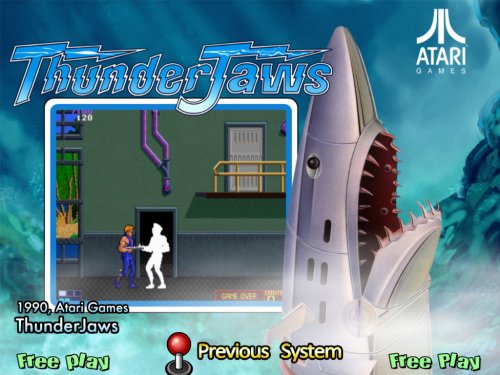 Well done. Major improvement.
- 7 comments
-
- 1
-
-
- thunderjaws
- thunder jaws
- (and 2 more)
-
As I go I'll post some overall direction as to what's needed but I find HS Content Creators in general have a wonderful knack for getting the aesthetic just right!
-
@thatman84 I am, don't worry. It's to make the app for everyone so assets are being stored in 4:3 SD/HD, 16:9 HD, with UHD backups for later. @adamg You're welcome to upload it and I can cross-check it against everything else. In a lot of case there is no mint set yet so it's just a matter of finding what exists.
- 288 replies
-
- 1
-
-
- koolaid man
- media
- (and 2 more)
-
Not as deep into systems today as I wanted to be but I diverted my attention back to some global assets. Namely: Converted Genre Backgrounds to 4:3 SD/HD Audited general genre background/wheel assets Added all the intro videos I can find Added all the No Video vides I can find Added 4:3 HD Exit/Favourites screens Added SD/HD nomenclature for all SWFable content Audited/added special artwork. I believe there's more out there than I could find so if you have any not on the list please let me know. Starting at Acorn Atom tomorrow and should hopefully be done backpeddling to global assets until I hit universal themes down the road.
- 288 replies
-
- 3
-
-
- koolaid man
- media
- (and 2 more)
-
- 288 replies
-
- 2
-
-
- koolaid man
- media
- (and 2 more)
-
@Kondorito Thanks haha don't gimme toooo much credit til the jobs done though But I have high hopes!
- 288 replies
-
- 2
-
-
- koolaid man
- media
- (and 2 more)
-
Ok I'm back at it. Historically, HyperSpin 1.4's greatest strength has been it's greatest weakness: near-unlimited customization. Your build can be jawdropping but it can also be a pain to get there and to keep up to date with new releases to maintain. HyperSync was meant to fix that issue and while it served as a valuable though imperfect tool, it failed in that regard. As such @fr0stbyt3 and I assessed our ultimate goals, threw the HyperSync media collection/distribution model out the window, and pulled a few all-nighters over the last several days to completely re-think the system from the ground up to create a framework we think will allow for a setup process that's user friendly while allowing overall setup to be as quick or meticulous as an individual user desires. The former sync model dealt with ~10 different media set types... the new system is going to handle up to about 200 distinct customization elements with the potential for more to be added with ease as they're introduced. Not all of them are being listed here now but in general I'm pretty excited about the level of detail we're taking this to. Global, Main Menu, and AAE assets updated on OP. Going to burn through Approved-DL section and Plat FTP now then pore over to Unsorted Submissions and Upload for Approval sections after. If anyone ever has something I've missed on a set I've already been over, even if I haven't hit up the Unsorted sections yet, don't hesitate to hit me up. Updating this thread slows me down but it's important to staying organized in a project of this size so Imma keep doing it and it helps us crowdsource anything that may be missing For MAME themes I'll generate a list of everything I can find as well, since I've noticed some people saying their themes are missing from the download section.
- 288 replies
-
- 5
-
-
- koolaid man
- media
- (and 2 more)

.png.0e74009f5aca810cb9cb125c0a6cf710.png)
.png.dd25247adefd3f074d4019265e5bb88c.png)
.png.b110519b1cd8e4b850acb11307a93f7a.png)
.png.8c0d406ca957bec7cd4f77c6cd68aeea.png)
.png.435bdf458ed88470f88ac6f857543add.png)
.png.7ccd7bb5275c72184682ea3c82d35046.png)
.png.7d0cf6816a639b22cb2fdc2dab573ef6.png)
.png.4ae6c9e0632aabe3a1366225a5c9cee7.png)


.png.bf65f1a63e271633f932675fd61387bb.png)