thatman84
-
Posts
3,651 -
Joined
-
Last visited
-
Days Won
9
Content Type
Forums
Events
Downloads
Store
Everything posted by thatman84
-

Problem with Sega Genesis Not Finding ROMS
thatman84 replied to JohnnyChimpo's topic in Emulators & Systems
Are the file extensions correct? -
You should definitely have media. close HyperHQ and right click and hit quit on the HQ icon in the system tray. Then reopen, if nothing downloads there’s a bug. you can try hitting refresh games in the mame games menu. That should go off and check for media. also you can try validating cache in HyperHQ settings cog top right of the progam.
-
Do you have a link to the theme you created in HyperTheme? im sure I tested it a while back but not recently. I may give it a try when I next poke around in HyperTheme
-
New Member Hoping for some HyperSpin 2.0 Direction
thatman84 replied to JohnnyChimpo's topic in HyperSpin General
Correct the roms don't matter on mame import. It just reads the game info from the mame game info not the roms themselves. -
New Member Hoping for some HyperSpin 2.0 Direction
thatman84 replied to JohnnyChimpo's topic in HyperSpin General
Nice, most of your time configuring will be spent in HyperHQ. check out the Docs tab in the forum title bar. It’s really got most stuff covered now -
New Member Hoping for some HyperSpin 2.0 Direction
thatman84 replied to JohnnyChimpo's topic in HyperSpin General
That is an error with HyperHQ. Check the plugins tab on the main screen and check if mame plugin is there and updated. A couple of the other testers have had this error recently so devs are aware -
The guys think they know what it is and will test/fix it up in the next week or two not holding anyone to time frames though. It’s made it to the list at least
-
Be handy to see those game names if possible? Help diagnose the technical logic issue
-
I’m checking to see if it’s a HQ or DB error. will report back when I know more
-
rondar's HyperSpin 2 HD Game Themes - Arcade PC/Teknoparrot WIP
thatman84 replied to rondar's topic in HyperTheme
That is an awesome theme and breakdown of the process. Not played that game and now I have to give it a shot -
Example not exact buttons:- If Lctrl is retropad A port1 and Retropad B is Z Port 1 Launch Atari game (Stella Core) go into Quick Menu F1 and choose Controls Remap. If Fire is retropad B you change it to Retropad A and save the remap file. You can only swap the configuration of the buttons assigned to Port1 Retropad.
-
Your in the right spot. ipac is just a keyboard afaik so setup all of your 4player keyboard buttons in the Port1-4 menu (No Core loaded) Retroarch is based on controllers. So you set your buttons which are fixed per player. You then reassign the emulated console button to already fixed keys per player in the Quick Menu -> Controls section Save Remap. Be aware of hotkeys, menu keys and emulated cores that accept keyboard by default (MAMECore, Amiga etc) more info here https://docs.libretro.com/guides/input-and-controls/#keyboard-controls it’s kinda reversed to most emulators where the emulated system controller is fixed and you click to assign the physical button you have.
-
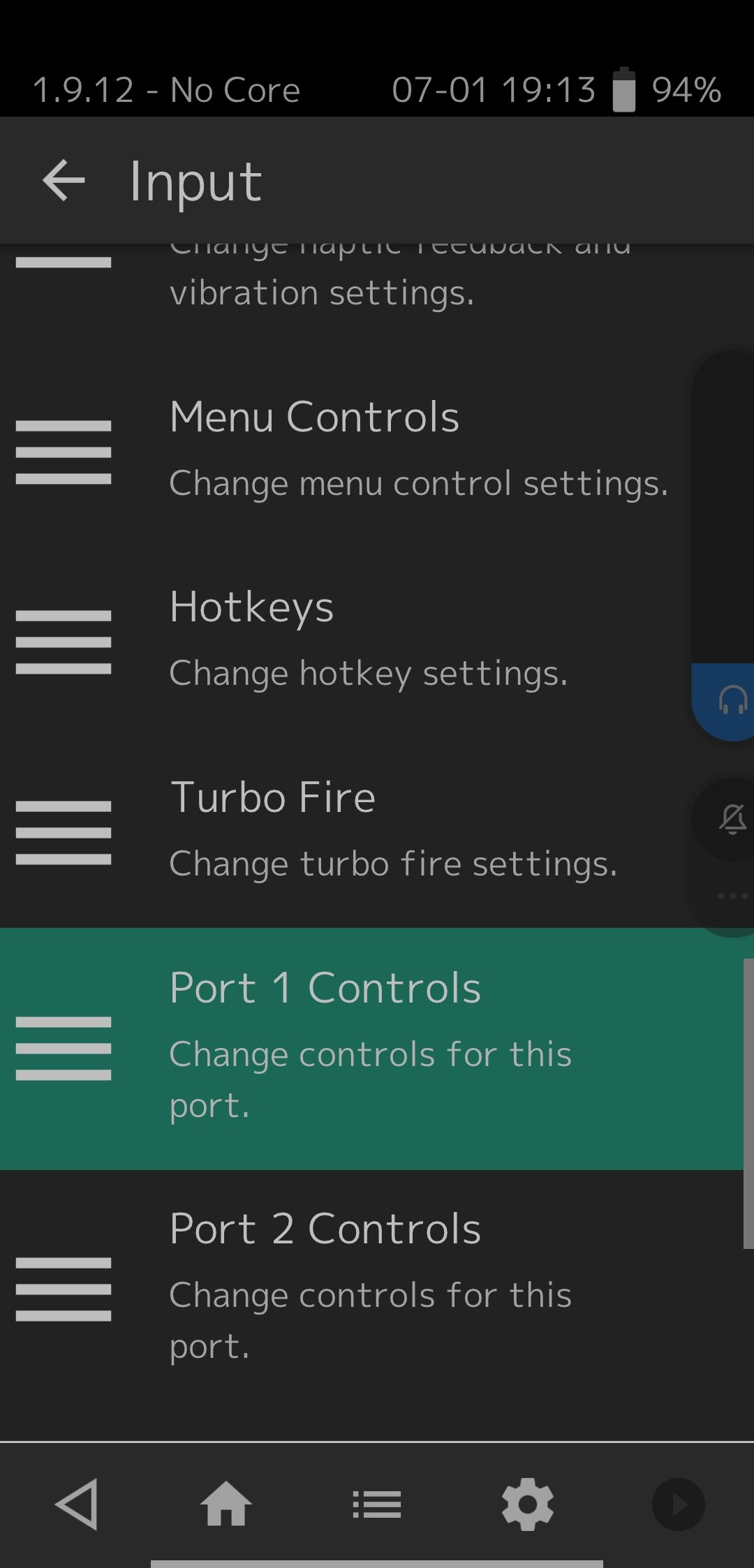
Possibly, I won't be at the computer for a few days. Similar layout across all platforms so here is a shot from my android RetroArch. Main Menu Settings -> Input -> Port 1 Controls

-
Probably worth opening retroarch directly from the emulators folder and see if the ipac is recognised in the input-port1 settings and mapping those how you would like as a default 1st.
-
HS2 is in beta still which means frequent updates and potential for breaking updates. It’s not time to hard swap yet but 100% worth getting setup along side your current 1.5 system to see all developments that have been cooking for the last few years
-
I only have 3 systems to play with but it all seems ok with the exception of moving a wheel to the bottom, which is easily worked around Will need to add enough systems to fill the list on-screen 20260102-1833-51.9693610.mp4
-
literally just turned my PC on to see if I have this issue
-
No themes from 1.5 are compatible with 2.0. All themes for 2.0 need to be configured with the new Hyper theme Platform. Documentation is out now and linked up at the top of the forum "docs" for HyperHQ and Hyper theme and plugins is there
-
Can you open HyperHQ? do you mean the new game system wizard or the actual installation wizard?
-
When legends return
-
Non-merged support has been worked on this week so should see improvement in the next release
-
Did it ever complete?
-
You can still download media from this forum. It’s in the Hyperspin 1.x section of the forum
-
SNK Neo Geo AES Main Menu Theme by: Unknown Preview Description SNK Neo Geo AES Main Menu. Graphics by Baddeolv! Details Type: Main Menu Theme Tags: neo,geo,aes,neo geo,snk,main,main menu,baddeolv Created: Mar 16, 2025 Download View on HyperTheme Credits tron38 (Animator)
-
I don’t think this setup has been looked at yet so the current method would probably be to split out the roms into separate folders. it does need looking into imo