thatman84
-
Posts
3,649 -
Joined
-
Last visited
-
Days Won
9
Content Type
Forums
Events
Downloads
Store
Everything posted by thatman84
-
Snagged my old hyperspin Settings_Android, Databases, Media/Main Menu + couple of system folders onto my Poco F1 phone but only getting a black screen. Settings screens work but no systems/wheels found. Am I missing a simple step here? Or just compatible issue
-
Images folders is for backgrounds generally the docs has more detail https://docs.hyperai.io/docs/hyperhq/managing-media
-
Relocated your thread to the Android subforum of Hyperspin Classic->Hyperspin 1.x Discussion -> Hyperspin Android you should find the answers in the guides of this forum. Also see the latest release of the app this week!
-
That’s a pretty serious update from the user guide details! Man I wish I still had the Shield TV
-
I wonder if the wheel images have not been reduced by .75 width to account for the 4:3 stretch hyperspin adds. Wow it’s been a while since I thought about! Glad your still kicking about Sonkun
-
I rarely game on droid now but occasionally on trips I will delve in, so do keep an eye on the scene a little (Not Shield specific). 3ds emu Azahar is a recent one I have seen chatter about, aPS3e/RPCS3 brings some games, NetherSX2 patch for PS2. My SD845 chip can run some stuff but I genuinely stay below PS2. With the SD elite stuff bringing so much power most of the hype has moved on to PC/Steam gaming apps like Game native and GameHub etc. I'm not sure where the Shield is at in the current landscape! Russ of retrogamecorps is usually on point.

-

rondar's HyperSpin 2 HD Game Themes - Arcade PC/Teknoparrot WIP
thatman84 replied to rondar's topic in HyperTheme
That intro emblem animation is genius-ly creative. Now bumped up my list of games to get working -
Fairly good timing DaveT, the Android Hyperspin dev just said they are working on a new version for the Shield
-
I will give that a test. How are you adding the .exe to HQ just so I can't do it step for step?
-
There are the global defaults in HQ settings and then when you add systems you get to choose media types be good to test and make sure there’s not a bug to report there
-
Happy to see you back at it, my Shield has been gone a few years now! I would be pretty amazed if your still rocking the original Portable
-
I'm 99% sure that's not been implemented yet. It has been requested.
- 1 reply
-
- 1
-

-
Some great looking themes baddie, really tempting me into TP full set at this rate
-
Still the same after Fridays update? They can't seem to stop adding new features ATM, I'm a little behind the curve right now. Worth submitting a bug report in the bug tracker https://hyperspin-fe.com/development-bug-tracking/11_hyperspin-2-bug-reporting/
-
MAME Bezel Theme Preview Description Bezel Theme Details Type: Main Menu Theme Tags: Arcade (MAME),Main Menu Theme Created: Feb 05, 2026 Download View on HyperTheme Credits nyny77 (Artist) nyny77 (Artist) alexdc22 (Artist)
-
Made new topic
-
Just testing now. 275 rom files imported. 295 sitting at 10%. Should be helpful info for the devs
-
There’s some focus on Hyperspin bugs this week so wouldn’t worry about trying to figure that out. I’m sure the guys will get a fresh build out sometime in the next few weeks
-
Glad you got the games running in Retroarch. I assume you were testing by opening Hyperspin/emulators/Retroarch/retroach.exe see what your game paths are showing in HyperHQ systems-> Sony PlayStation -> Games and hit the edit pencil and choose game paths. you may need to rescan if you haven’t done so since updating the games to CHD
-
Yes HyperHQ is sending the folder not the cue file. you can try deleting and importing again. Turn on search subfolders in the import wizard
-
are your games in individual folders? Under the edit pencil on the game in HyperHQ check the game paths see if its got the actual file and extension
-
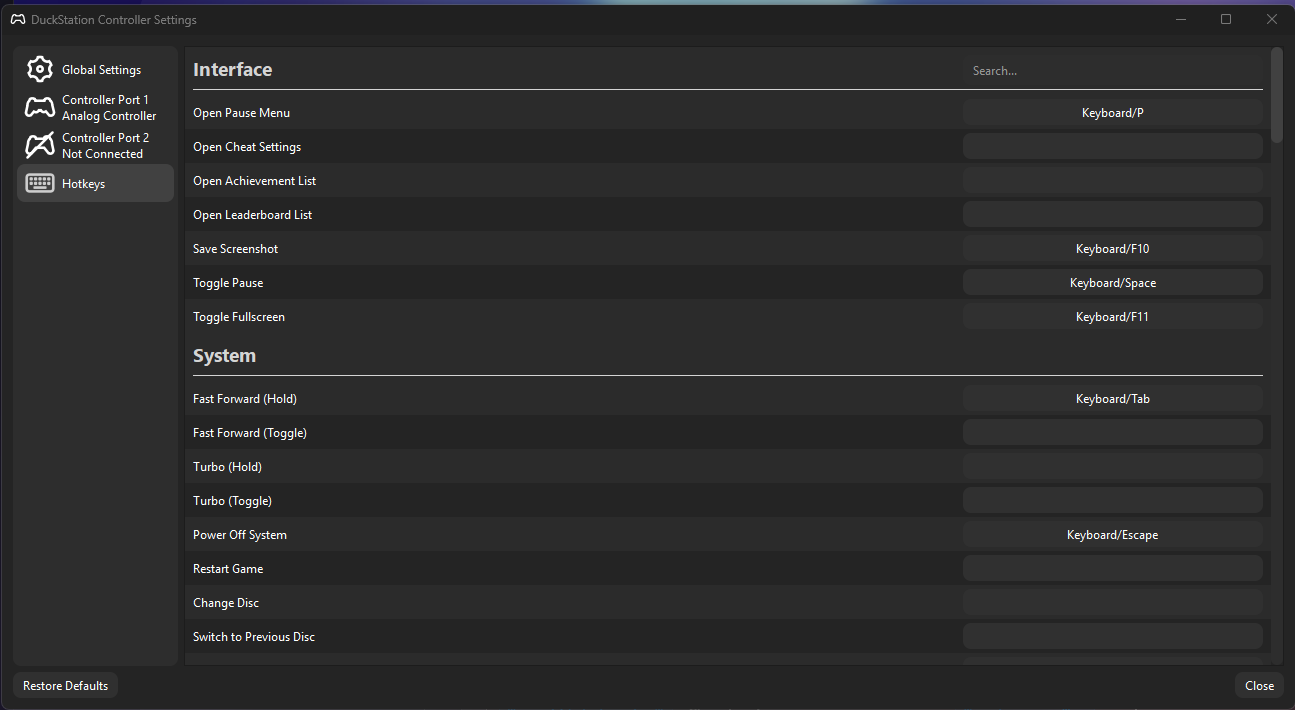
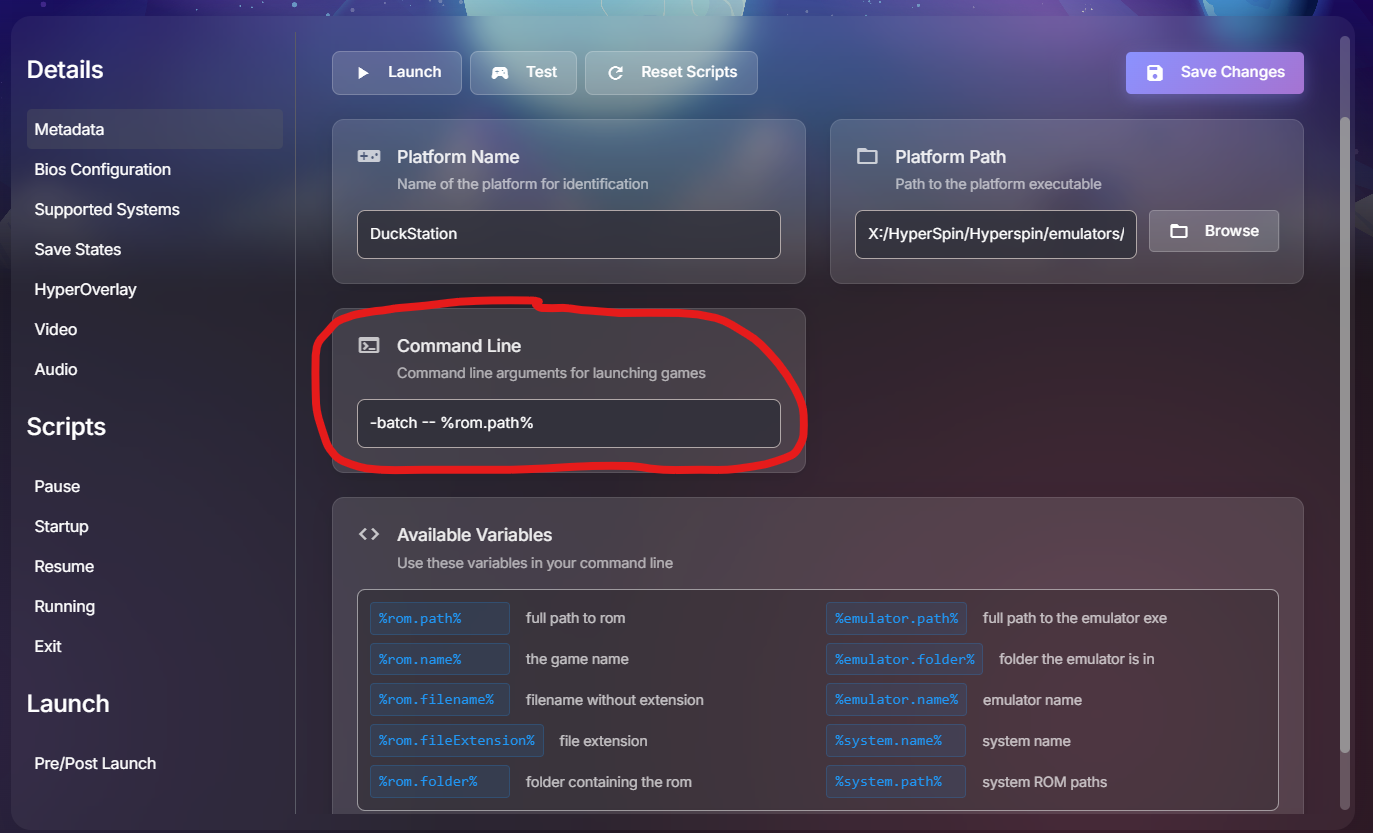
I was just playing with this and @32assassin thread linked. I have set the DuckStation "Open Pause Menu" Hotkey to P instead of Escape. I have set the "Power Off System" Hotkey to Escape In the HyperHQ Platform settings for DuckStation I added the -batch command to the launching. Seems to work fine with latest releases of HQ and HS
-
I think you may be right. I think wait for the next public release. I shouldn’t be to far away.
-
Problem with Sega Genesis Not Finding ROMS
thatman84 replied to JohnnyChimpo's topic in Emulators & Systems
Are the file extensions correct? -
You should definitely have media. close HyperHQ and right click and hit quit on the HQ icon in the system tray. Then reopen, if nothing downloads there’s a bug. you can try hitting refresh games in the mame games menu. That should go off and check for media. also you can try validating cache in HyperHQ settings cog top right of the progam.